Table of Contents
Imagine sitting down for an intense gaming session, seamlessly switching between your powerful PC and the latest console without a single hiccup. No more scrambling for different cables, adjusting settings for each device, or compromising on visual quality depending on your platform. This dream of a truly unified gaming experience is becoming increasingly achievable, but only if you choose the right monitor. The landscape for 2026 demands more than just a bright screen; it requires a display engineered to bridge the unique worlds of high-fidelity PC gaming and the plug-and-play simplicity of modern consoles, handling everything from competitive esports to cinematic single-player adventures with equal finesse.
Gone are the days when a basic 1080p monitor sufficed for all setups. Today’s hybrid gamers face a complex web of standards: HDMI 2.1 bandwidth limitations, conflicting adaptive sync technologies, resolution scaling quirks between platforms, and input lag nuances that can make or break a competitive edge. Choosing poorly means dealing with frustrating stutter, annoying black screens, or being locked into subpar settings that don’t utilize your hardware’s full potential. This guide cuts through the marketing noise, focusing squarely on the technical specifications and real-world compatibility factors that actually matter for a monitor destined to serve both your console and PC equally well in the evolving ecosystem of 2026. Let’s unpack what it truly takes to find your perfect dual-use display.
Top 10 Gaming Monitors for PC and Console
Detailed Product Reviews
1. Sceptre Curved 24-inch Gaming Monitor 1080p R1500 98% sRGB HDMI x2 VGA Build-in Speakers, VESA Wall Mount Machine Black (C248W-1920RN Series)

Overview: This 24-inch curved gaming monitor from Sceptre targets budget-conscious users seeking immersion without breaking the bank. Featuring a 1800R curvature, 1080p resolution, and 75Hz refresh rate, it aims to deliver a basic but engaging visual experience for casual gaming and everyday computing tasks on Windows 10/11 systems. What Makes It Stand Out: The 1800R curve provides a subtle wraparound effect enhancing immersion, while built-in speakers and dual HDMI/VGA ports offer versatile connectivity. Its 98% sRGB coverage ensures decent color accuracy for the price point, and VESA compatibility adds flexible mounting options. Value for Money: Priced affordably, it delivers essential curved-monitor benefits where pricier competitors dominate. While the 75Hz refresh rate lags behind modern gaming standards, it’s sufficient for non-competitive play, making it ideal for users prioritizing immersion over high-speed performance. Strengths and Weaknesses: Strengths include the immersive curve, built-in speakers, solid color gamut, and low cost; weaknesses are the modest 75Hz refresh rate, inconsistent brightness specs (220 vs. 250 cd/m²), average contrast, and basic response time unsuitable for fast-paced games. Bottom Line: A solid entry-level curved monitor for casual users and office work, but gamers needing high refresh rates should look elsewhere; excellent value for its core audience seeking immersion on a tight budget.
2. SANSUI 24 Inch Curved 160Hz Gaming Monitor,1500R Curved Gaming Monitor FHD 1080P Computer Monitor,MPRT 1ms Fast VA Display,Freesync,HDR,3000:1, HDMI2.0,DP1.4, VESA Support(ES-G24C1L HDMI Cable Incl.)
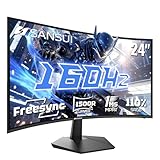
Overview: SANSUI’s 24-inch curved monitor packs high-speed gaming features into an affordable package. Boasting a 160Hz refresh rate, 1ms MPRT response time, and 1500R curvature, it targets competitive gamers wanting fluid motion handling without overspending on premium brands. What Makes It Stand Out: The standout features are the 160Hz refresh rate with DP 1.4/HDMI 2.0 support, near-instant 1ms MPRT, and impressive 3000:1 contrast ratio from its VA panel. HDR support, 110% sRGB coverage, and game-specific modes (FPS/RTS) further enhance its appeal for immersive gameplay. Value for Money: Exceptional value for high-refresh-rate gaming. It undercuts major brands significantly while delivering critical specs like 160Hz and Freesync, making it ideal for budget-focused gamers who prioritize smooth visuals over top-tier color accuracy. Strengths and Weaknesses: Strengths include the high 160Hz refresh rate, deep contrast, rich color gamut, versatile ports, and excellent warranty; weaknesses are VA panel limitations (slower pixel response in dark scenes), no built-in speakers, and potentially narrow viewing angles. Bottom Line: A compelling budget gaming monitor that punches above its weight with speed and contrast; highly recommended for competitive gamers seeking high refresh rates without premium pricing.
3. Dell Gaming Tower Desktop PC – Intel Core i5-6500 6th Gen – 16GB DDR4 RAM – 256GB SSD – 500GB HDD – GeForce GT 1030 – 22" Monitor – RGB Keyboard & Mouse – Windows 11 Pro – Gaming Computer (Renewed)

Overview: This renewed Dell desktop bundle offers an all-in-one entry point to PC gaming, featuring a 6th-gen Intel i5-6500, GT 1030 GPU, and dual-storage setup. It targets casual users needing a ready-to-play system for light gaming and productivity on Windows 11 Pro. What Makes It Stand Out: The inclusion of a full setup—22" monitor, RGB peripherals, and Windows 11 Pro—is rare at this price for renewed systems. The 256GB SSD ensures snappy boot times alongside 500GB HDD storage, simplifying setup for non-technical users. Value for Money: Strong value as a renewed package, but limited as new hardware. The GT 1030 handles only esports titles at low settings, and the i5-6500 is outdated for modern AAA games. Justifiable only for budget-conscious beginners or office/light-use scenarios. Strengths and Weaknesses: Strengths are the complete out-of-box experience, SSD/HDD combo, and renewed affordability; weaknesses include the underpowered GT 1030 GPU, aging CPU, and inability to run demanding games, limiting longevity. Bottom Line: A practical renewed starter PC for casual use or very light gaming, but avoid if expecting serious gaming performance; ideal for budget buyers prioritizing convenience over future-proofing.
4. New! Sceptre Curved 30-inch Gaming Monitor 200+Hz FreeSync Build-in Speakers 2560 x 1080p HDMI DP Machine Black 2026 (C305B-200UN Series)

Overview: Sceptre’s 30-inch ultra-wide monitor combines an immersive 21:9 aspect ratio with high-speed gaming capabilities. Featuring 200+Hz refresh rate, FreeSync, and built-in speakers, it caters to gamers wanting cinematic field-of-view and competitive responsiveness in a single display. What Makes It Stand Out: The ultra-wide 21:9 format and 200+Hz refresh rate via DisplayPort are rare at this price. FreeSync eliminates tearing, while FPS/RTS presets and blue light reduction enhance usability. Built-in speakers add convenience missing in many ultrawides. Value for Money: Excellent for ultrawide enthusiasts seeking speed. Though 1080p resolution on 30 inches lowers pixel density, the 200Hz capability targets competitive gamers where immersion and motion clarity outweigh raw sharpness, offering niche value. Strengths and Weaknesses: Strengths include the ultrawide format, high 200+Hz refresh rate, FreeSync, and built-in speakers; weaknesses are the relatively low 1080p resolution for size, 5ms GTG response time (sluggish for esports), and limited viewing angles. Bottom Line: A specialized choice for gamers prioritizing ultrawide immersion and high refresh rates over pixel density; best for racing/sim titles or users who value the format, but less ideal for competitive shooters due to response times.
5. INNOCN 24.5" QHD 2K 1440P 240Hz Gaming Monitor for PS5, Xbox Console, PC Computer, IPS HDR400 1Ms HDMI 2.1, DisplayPort, Low Blur, Height/Pivot Adjustable Stand, Black - 25G2S Plus
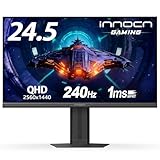
Overview: INNOCN’s 24.5-inch QHD monitor merges console compatibility with high-refresh PC gaming. Featuring 240Hz refresh rate, IPS HDR400, and HDMI 2.1, it bridges the gap between PC and console gamers seeking sharp, fluid visuals across platforms. What Makes It Stand Out: HDMI 2.1 support for PS5/Xbox at up to 120Hz is a major differentiator. Combined with 240Hz for PC, 1ms response, 99% sRGB, and an adjustable stand, it offers rare versatility. The QHD resolution strikes a sweet spot between clarity and performance. Value for Money: High value for multi-platform users. While pricier than 1080p options, the QHD resolution, console-ready HDMI 2.1, and 240Hz refresh rate justify the cost for gamers invested in both PC and next-gen consoles, outperforming single-use monitors. Strengths and Weaknesses: Strengths include HDMI 2.1 for consoles, superb 240Hz QHD performance, IPS color accuracy, and ergonomic stand; weaknesses are HDR400’s limited impact and potential backlight bleed common in IPS panels. Bottom Line: A top-tier choice for hybrid gamers needing one monitor for PC and console, delivering exceptional speed, resolution, and connectivity; highly recommended for those prioritizing cross-platform flexibility and future-proof specs.
6. ASUS TUF Gaming 27” 4K HDR Monitor (VG27UQ1A) – 160Hz, 1ms, Extreme Low Motion Blur Sync, NVIDIA G-SYNC Compatible, AMD FreeSync Premium, 95% DCI-P3, DisplayWidget, 3 yr Warranty

Overview: The ASUS TUF VG27UQ1A is a premium 27-inch 4K gaming monitor targeting enthusiasts seeking high resolution and speed. It combines UHD clarity with a 160Hz refresh rate, HDR support, and robust adaptive sync compatibility for versatile use in gaming and content creation.
What Makes It Stand Out: Its standout feature is Extreme Low Motion Blur Sync (ELMB Sync), uniquely merging motion blur reduction with G-SYNC/FreeSync to eliminate both ghosting and tearing simultaneously. The 95% DCI-P3 color gamut and HDR performance deliver professional-grade visuals, while the 3-year warranty and DisplayWidget software enhance long-term value and usability.
Value for Money: Priced at the premium end, it justifies cost through exceptional 4K gaming fluidity rarely found below 32 inches. Competitors often sacrifice refresh rate for resolution, but this balances both, making it a strong investment for 4K gamers unwilling to compromise on speed.
Strengths and Weaknesses: Strengths: Outstanding motion clarity with ELMB Sync; superb color accuracy; sturdy build; comprehensive warranty. Weaknesses: Limited HDR peak brightness (typical for IPS); 27" 4K may require scaling for desktop UI; no USB hub.
Bottom Line: An elite 4K gaming monitor that excels in motion handling and color fidelity. Ideal for competitive and immersive gamers prioritizing resolution without sacrificing refresh rate, though budget-conscious users may find smaller 1440p panels more practical.
7. INNOCN 27" QD-OLED 2K QHD 2560 x 1440P 280Hz 240Hz PC Computer Gaming Console Monitor, 0.03ms, HDR400, 10Bits, HDMI 2.1, DisplayPort, Built-in Speaker, Height Pivot Adjustable Stand - 2780s

Overview: The INNOCN 2780s leverages cutting-edge QD-OLED technology in a 27-inch 1440p panel, targeting competitive gamers with blistering 280Hz refresh rates and near-instantaneous response times. It supports next-gen consoles via HDMI 2.1 and emphasizes visual fidelity through perfect blacks and vibrant colors.
What Makes It Stand Out: QD-OLED technology delivers infinite contrast, pixel-perfect blacks, and exceptional color volume unattainable by LCDs. The 0.03ms response time virtually eliminates motion blur, while HDMI 2.1 ensures seamless console compatibility. The fully adjustable stand and built-in speakers add unexpected convenience.
Value for Money: Positioned as a mid-to-high-tier option, it offers OLED’s superior image quality at a fraction of flagship prices. Though pricier than standard IPS panels, the immersive contrast and speed justify the cost for serious gamers, especially with console integration.
Strengths and Weaknesses: Strengths: Unmatched contrast and color depth; industry-leading 280Hz/0.03ms performance; excellent viewing angles; versatile stand. Weaknesses: OLED burn-in risk with static content; HDR400 peak brightness limits impact; speakers are low-fidelity.
Bottom Line: A groundbreaking QD-OLED monitor delivering cinematic contrast and esports-grade speed. Best for gamers prioritizing visual immersion and competitive edge, but requires cautious usage to mitigate burn-in concerns.
8. SANSUI Gaming Monitor, 24 Inch 180Hz, FHD 1080P 1ms 110% sRGB Computer Monitor, HDMI DP Ports VESA Support for Game Office (HDMI Cable Included)

Overview: SANSUI’s 24-inch 1080p monitor delivers high-speed gaming on a budget, featuring 180Hz refresh rates and 1ms response times. Aimed at casual gamers and office users, it emphasizes smooth visuals, color vibrancy, and ergonomic flexibility with VESA compatibility.
What Makes It Stand Out: Its 110% sRGB color gamut and 80% DCI-P3 coverage outperform most budget monitors, providing rich hues for gaming and light creative work. Game-specific modes (FPS, RTS) and included HDMI cable enhance accessibility, while flicker-free tech prioritizes eye comfort during extended use.
Value for Money: Exceptionally affordable for 180Hz performance, undercutting rivals like Acer or ASUS by 20-30%. It’s ideal for entry-level gamers seeking smooth 1080p gameplay without overspending, though 1440p alternatives may offer sharper resolution at similar prices.
Strengths and Weaknesses: Strengths: Outstanding color range for price; low input lag; versatile FreeSync support; strong warranty. Weaknesses: Limited to 1080p resolution; no built-in speakers; basic stand adjustability; HDR is largely ineffective.
Bottom Line: A stellar budget pick for competitive esports gamers needing high refresh rates and vivid colors. Compromises on resolution and audio are fair trade-offs for the price, making it a smart entry-point for gaming setups.
9. CRUA 34’’ Ultrawide Gaming Monitor 120HZ, 21:9 WFHD 2560X1080 IPS Panel Computer Monitors with Built-in Speakers, Support AMD FreeSync, 120% sRGB, DP1.4 & HDMI1.4, Wall Mountable Installs-White

Overview: CRUA’s 34-inch ultrawide offers a 21:9 aspect ratio for immersive gaming and multitasking, pairing 120Hz refresh rates with an IPS panel. Designed for productivity and entertainment, it features built-in speakers and a white finish, targeting users seeking workspace expansion.
What Makes It Stand Out: The expansive screen excels in multitasking—displaying multiple apps side-by-side—and delivers cinematic immersion in games. 120% sRGB coverage ensures vibrant colors, while built-in speakers and a blue light filter add convenience for office/gaming hybrids often missing in competitors.
Value for Money: Priced competitively against ultrawides like ASUS or LG, it offers strong color accuracy and speaker integration at a mid-range cost. However, the 120Hz refresh rate lags behind 144Hz+ rivals, making it better suited for casual gamers than esports enthusiasts.
Strengths and Weaknesses: Strengths: Excellent multitasking efficiency; wide color gamut; comfortable viewing angles; useful speakers; ergonomic stand. Weaknesses: Modest 120Hz refresh rate; HDMI 1.4 limits console compatibility; IPS glow in dark scenes; speakers lack bass.
Bottom Line: A compelling ultrawide for productivity-focused users and casual gamers, though competitive players should prioritize higher refresh rates. The speakers and color performance justify its value for hybrid work-play setups.
10. SANSUI 34 Inch 240Hz Ultrawide Curved Gaming Monitor UWQHD 3440×1440, 21:9 2K Curved Monitor 1500R,HDR400,Fast VA, PIP/PBP,AI Crosshair,AIPQ(Visual Enhance),MPRT 1ms,HDMI2.12,DP1.42(DP Cable Incl.)
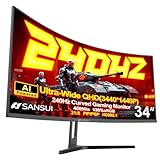
Overview: SANSUI’s 34-inch curved ultrawide packs a 240Hz refresh rate into UWQHD resolution, targeting competitive gamers with aggressive motion handling. Its 1500R curvature and AI-enhanced features (like crosshair overlays) cater to immersive, high-stakes gameplay.
What Makes It Stand Out: The rare 240Hz in ultrawide format eliminates motion blur in fast-paced games, while the 1500R curve enhances peripheral vision. AI tools (PQ, crosshair) and dual HDMI 2.1 ports for console support differentiate it from static alternatives, offering tailored gaming utilities.
Value for Money: It undercuts premium brands (e.g., Samsung, LG) significantly for 240Hz UWQHD, though VA panel limitations (viewing angles, ghosting) may deter purists. The price is justified for esports-focused ultrawide users prioritizing speed over color accuracy.
Strengths and Weaknesses: Strengths: Blistering 240Hz refresh rate; immersive curvature; robust 130% sRGB/97% DCI-P3 coverage; versatile connectivity. Weaknesses: VA panel smearing in dark scenes; AI features feel gimmicky; no speakers; curvature may distort productivity work.
Bottom Line: A niche powerhouse for ultrawide esports gamers needing extreme speed, but casual users should consider IPS alternatives for better color consistency. A bold choice where motion clarity trumps all else.
Core Display Fundamentals for Hybrid Gaming
Resolution and Scaling Realities
Understanding resolution is paramount, but it’s not just about the number. 4K remains the sweet spot for most living room/console setups in 2026, offering significant clarity over 1080p without the extreme bandwidth demands of 8K, which is still largely impractical for mainstream gaming. However, PC gamers often push higher resolutions like 1440p for its balance of sharpness and performance. Crucially, consider how well the monitor handles scaling – when your console outputs 1080p content on a 4K screen, or your PC game runs at a lower resolution for speed, the quality of the upscaling or downscaling algorithm significantly impacts image clarity and smoothness. Look for monitors with robust, low-latency scaling processors to avoid blurry or jagged visuals during resolution mismatches.
Refresh Rate: Beyond the Big Number
While high refresh rates (120Hz, 144Hz, 165Hz+) are essential for smooth motion, especially on PC, their implementation for console use requires deeper scrutiny. Most current-gen consoles target 60Hz or 120Hz for specific titles, but future updates may push higher. The critical factor is sustained performance across both platforms. Ensure the monitor reliably achieves its advertised refresh rate over HDMI 2.1 at 4K resolution – a common pitfall is monitors only hitting 120Hz+ at lower resolutions via HDMI, which defeats the purpose for console gaming. Also, verify the monitor supports the specific refresh rate steps your console outputs (e.g., 120Hz, not just 144Hz) to avoid compatibility headaches.
Panel Technology Trade-offs
The panel type (IPS, VA, OLED) fundamentally shapes your visual experience. IPS panels dominate for PC due to wide viewing angles and vibrant colors, crucial for multiplayer or shared viewing, but may suffer from IPS glow and slightly lower contrast. VA panels offer superior contrast and deep blacks, ideal for dark cinematic games on the couch, but often have slower pixel response times leading to more motion blur during fast-paced action and narrower viewing angles. OLED delivers unparalleled contrast, perfect blacks, and near-instant response times, making it compelling for both platforms, but concerns around potential burn-in with static HUD elements (common in many games) and higher cost require careful consideration for long-term, varied gaming use. Prioritize based on your dominant game genres and viewing environment.
Console-Specific Connectivity & Features
HDMI 2.1: Non-Negotiable Bandwidth
This is the absolute cornerstone for modern console gaming. HDMI 2.1 provides the necessary bandwidth (48 Gbps) for 4K resolution at 120Hz, essential for next-gen console titles pushing high frame rates. Crucially, verify the monitor has multiple full-bandwidth HDMI 2.1 ports (look for specifications stating 48Gbps support per port). Many monitors only offer one true HDMI 2.1 port, forcing you to choose between your console and potentially a future media device. Features like Auto Low Latency Mode (ALLM) and Quick Frame Transport (QFT), mandated by the HDMI 2.1 spec, should also be present to automatically switch to game mode and reduce lag.
VRR Compatibility Across Platforms
Variable Refresh Rate (VRR) is transformative, eliminating screen tearing and stutter. However, the ecosystem is fragmented. Consoles primarily use HDMI Forum VRR, while PC often relies on AMD FreeSync or NVIDIA G-Sync Compatible over DisplayPort. For true dual-use harmony, the monitor must support HDMI Forum VRR robustly. Check compatibility lists or user reports specifically for your console model (e.g., PS5, Xbox Series X/S) to ensure stable VRR implementation. While FreeSync over HDMI is common and often works with consoles, pure HDMI Forum VRR support is the most future-proof and universally compatible solution for console VRR in 2026.
Input Lag: Minimizing the Disconnect
Input lag – the delay between pressing a button and seeing the action on screen – is critical, especially for competitive PC gaming but also noticeable in fast-paced console titles. Look for monitors specifically advertising low input lag figures (under 10ms at 1080p/144Hz, under 15ms at 4K/120Hz is excellent) measured in Game Mode. Be wary of manufacturers only quoting response times (GTG), which measure pixel color change, not the full system latency. True hybrid gaming monitors prioritize minimal end-to-end input lag across all supported resolutions and refresh rates, particularly when VRR is active.
PC-Centric Performance & Flexibility
DisplayPort 2.0/1.4: The PC Backbone
While HDMI 2.1 handles the console, a robust DisplayPort connection is vital for PC. DisplayPort 1.4 remains widely used, supporting 4K at 120Hz with DSC (Display Stream Compression), but DisplayPort 2.0 adoption is accelerating in 2026, offering vastly higher bandwidth (up to 77.4 Gbps) for future-proofing 4K 144Hz+ or even 8K gaming without compression. Ensure your monitor has at least one DisplayPort 1.4 (mandatory for most current high-refresh 4K PC gaming) and ideally DisplayPort 2.0 for longevity. Verify DSC compatibility if relying on it, as some older GPUs might have issues.
Adaptive Sync Ecosystem Integration
Beyond basic VRR, deep integration with PC adaptive sync standards matters. While HDMI Forum VRR covers the console side, seamless PC operation benefits from full compatibility with AMD FreeSync Premium/Pro or NVIDIA G-Sync Compatible (verified) certifications. This ensures not just basic VRR functionality but also features like low framerate compensation (LFC) to prevent stutter when frame rates drop below the minimum VRR range, and certified smoothness across the entire variable refresh range. Prioritize monitors with wide VRR ranges (e.g., 48Hz to max refresh rate) for maximum compatibility with fluctuating PC frame rates.
Overclocking and Custom Resolutions
PC gamers often push beyond standard specs. Check if the monitor supports overclocking its native refresh rate (e.g., a 165Hz panel pushing to 180Hz) via the OSD, which can provide a tangible smoothness boost. Furthermore, support for custom resolutions and timings through tools like CRU (Custom Resolution Utility) is invaluable for PC users seeking specific aspect ratios (ultrawide, 1440p) or optimizing performance in older games or emulators. Monitors with flexible timing control offer significantly more long-term utility for the PC side of your setup.
Image Quality & User Experience Essentials
HDR: Managing Expectations Realistically
High Dynamic Range (HDR) promises stunning visuals, but implementation is key. True HDR requires high peak brightness (600 nits+ for meaningful impact, 1000+ for HDR1000), local dimming (FALD or full-array), and wide color gamut coverage (90% DCI-P3+). Many monitors labeled “HDR” are basic HDR10 with minimal brightness or dimming, offering little real-world benefit over SDR, especially in typical living room lighting. For a dual-use monitor, prioritize models with verified HDR performance suitable for your environment. If your room is bright, extreme brightness might be less critical than excellent SDR calibration; in a dark room, local dimming becomes more valuable for console HDR movies and games.
Color Accuracy and Calibration Options
Consistent, accurate colors enhance immersion whether you’re exploring a vast open world on console or editing textures on PC. Look for monitors with factory calibration reports (delta-E < 2 is excellent) and wide color gamut coverage (sRGB 100%, DCI-P3 90%+). Crucially, check for robust on-screen display (OSD) controls that allow fine-tuning white point, gamma, and individual color channels. Presets for different use cases (sRGB, Cinema, Game) are helpful, but manual calibration options ensure you can tailor the display perfectly for both console media consumption and PC color-critical work or specific game settings.
Ergonomics and Physical Design
Don’t underestimate the physical experience. A sturdy stand with height, tilt, swivel, and pivot (for portrait mode on PC) adjustment is essential for comfortable long sessions, whether at a desk or across a living room. VESA mount compatibility (100x100mm is standard) is non-negotiable for future flexibility with monitor arms or wall mounts. Consider the footprint – a large monitor with a wide base might not fit your entertainment stand. Also, evaluate the OSD navigation; an intuitive, responsive menu system accessible via a joystick is vastly preferable to clunky button menus, especially when making quick adjustments mid-session.
Future-Proofing Considerations for 2026
Emerging Standards Readiness
The tech landscape evolves rapidly. While HDMI 2.1 and DisplayPort 2.0 are current flagships, keep an eye on developments like next-gen HDMI specs (2.1a/b features) or advanced features in DisplayPort 2.0 (like Panel Self-Refresh for ultra-low power idle states). Monitors designed with firmware-updatable capabilities via USB-C might offer better longevity. Consider if features like ALLM scaling (automatically adjusting resolution based on content) or enhanced audio return channel (eARC) for high-bitrate audio are important for your setup, as these become more prevalent.
Power Consumption and Longevity
High-refresh, high-brightness monitors consume significant power. Check energy efficiency ratings (like ENERGY STAR) and typical power draw figures, especially if you game for extended periods. For OLED panels, understand the manufacturer’s mitigations against burn-in (pixel shift, logo dimming, refresh options) and the expected lifespan under typical gaming usage patterns. Robust construction and quality components contribute to longevity, avoiding issues like dead pixels or failing backlights years down the line.
Software and Firmware Support
A monitor is no longer just a dumb display. Evaluate the manufacturer’s track record for releasing firmware updates that fix bugs, improve compatibility (especially crucial for evolving console OS updates), or even add new features. Access to companion software for easier on-PC calibration or profile switching (though less common for gaming monitors) can be a bonus. Good customer support channels for technical issues specific to gaming scenarios are also a valuable, often overlooked, aspect of long-term satisfaction.
Setting Up Your Dual-Use Monitor for Success
Cable Quality and Certification
Never underestimate the cable. For HDMI 2.1 at 4K/120Hz, you need certified Ultra High Speed HDMI cables (look for the official label). Cheap, uncertified cables often fail at these bandwidths, causing intermittent dropouts, black screens, or reduced resolution. Similarly, for DisplayPort 1.4 or 2.0, use cables certified for the required version (e.g., DP 1.4 HBR3, DP 2.0 UHBR10). Investing in reputable, certified cables from known brands prevents countless frustrating “is it the monitor or the cable?” troubleshooting sessions.
Optimizing Console Settings
Consoles often require specific manual configuration to unlock the monitor’s full potential. This typically involves navigating deep into the console’s video output settings to manually select 4K resolution, 120Hz refresh rate (if supported for the app/game), and enabling HDR or VRR. Auto-detection frequently defaults to safer, lower settings. Consult your console’s support pages for the exact steps to force the optimal signal. Also, ensure Game Mode is enabled on both the console and the monitor for the lowest possible input lag.
Fine-Tuning PC Settings for Stability
On the PC side, leverage your GPU control panel (NVIDIA Control Panel or AMD Adrenalin) to manage VRR. Enable G-Sync Compatible or FreeSync, set the preferred refresh rate, and configure low framerate compensation. Use tools like NVIDIA’s Scan Rate Cap or AMD’s Enhanced Sync cautiously, as they can sometimes introduce artifacts; the native VRR implementation is usually best. Disable any unnecessary post-processing effects in the GPU panel that add latency. For DisplayPort, ensure the monitor is set to its highest available bandwidth mode (e.g., DP 1.4 HBR3) within the monitor’s OSD.
Frequently Asked Questions
What’s the single most important spec for a console/PC dual-use monitor in 2026?
HDMI 2.1 support with multiple full-bandwidth ports is non-negotiable for reliable 4K 120Hz gaming on current and near-future consoles, while also providing essential features like ALLM and QFT. Without this, console performance will be severely limited.
Do I absolutely need a monitor with both HDMI 2.1 and DisplayPort 2.0?
While DisplayPort 2.0 is excellent for future PC gaming, DisplayPort 1.4 is still perfectly sufficient for most high-refresh 4K PC gaming today and for the foreseeable near future. HDMI 2.1 is far more critical for the console side. Prioritize robust HDMI 2.1 implementation first.
Can I use G-Sync or FreeSync with my console?
Consoles primarily use HDMI Forum VRR. While many monitors support FreeSync over HDMI (which often works with consoles), true compatibility and stability are best achieved with monitors explicitly supporting HDMI Forum VRR. G-Sync (proprietary) over HDMI is generally not supported by consoles.
Why does my console sometimes not detect 4K 120Hz even with an HDMI 2.1 cable?
This is common. You usually need to manually configure the console’s video output settings to force 4K resolution and 120Hz (if the game/app supports it). Auto-detection often defaults to lower settings. Also, ensure Game Mode is enabled on both the console and monitor.
Is OLED worth the risk for dual-use gaming considering burn-in?
OLED offers superior image quality, but burn-in risk with static gaming HUDs is real. Evaluate your gaming habits: if you play many hours of games with persistent static elements (scoreboards, maps), LCD with FALD might be safer. If you play varied titles and utilize burn-in prevention features, OLED’s benefits can outweigh the risk for many users.
How do I know if a monitor’s VRR works well with my specific console?
Check official compatibility lists from the monitor manufacturer (if available) and search reputable gaming forums or review sites for user experiences specifically mentioning your console model (e.g., “PS5 VRR issues with [Monitor Model]”). Official specs rarely tell the full story on real-world stability.
Does Display Stream Compression (DSC) cause noticeable quality loss?
When implemented correctly (which is standard for certified DP 1.4 and HDMI 2.1), DSC is visually lossless for gaming content. You will not perceive any difference in image quality compared to an uncompressed signal at the same resolution and refresh rate. It’s essential for achieving high bandwidths.
Why is input lag higher at 4K compared to 1080p on the same monitor?
Processing higher resolution signals requires more work from the monitor’s scaler and internal electronics, inherently adding a few milliseconds of latency. This is why lag is usually lowest at the panel’s native resolution and refresh rate. Good monitors minimize this delta.
Should I prioritize a higher refresh rate or higher resolution for competitive PC gaming on a dual-use monitor?
For pure competitive advantage on PC, a higher refresh rate (e.g., 144Hz+ at 1080p or 1440p) generally provides a smoother, more responsive experience than 4K at 60Hz/120Hz. However, the best dual-use monitors now deliver excellent 4K 120Hz+ performance, offering the best of both worlds if budget allows.
How can I test for actual input lag before buying?
Manufacturer specs are often unreliable. The best methods are checking professional reviews that measure lag with tools like the Leo Bodnar tester, or looking for user reports specifically mentioning low lag during fast-paced gameplay. In-store testing with a familiar fast-paced game is also valuable if possible.
See Also
- 10 Best Gaming Desks for Dual Monitors for Enhanced Productivity in 2026
- 10 Best Gaming Desks for Dual Monitors After 6 Months of Testing in 2026
- 10 Best Gaming Monitors for Console Gamers: 10 Expert Picks for 2026
- 10 Premium Gaming Desks for Dual Monitors (Worth the Investment)
- We Tested 50 HDR Gaming Monitors - Here are the 10 Best for Console Gamers in 2026