Table of Contents
Virtual reality has transformed from a futuristic fantasy into an accessible gateway for imagination, learning, and play—and in 2026, it’s becoming an increasingly popular choice for families looking to blend entertainment with education. As younger generations grow up as digital natives, parents are discovering that VR offers more than just gaming; it provides immersive experiences that can spark creativity, enhance spatial reasoning, and even support remote learning in ways traditional screens simply cannot match.
But navigating the VR landscape for children and teenagers requires careful consideration beyond just technical specifications. From ensuring age-appropriate content to prioritizing physical comfort and safety features, the decision involves balancing your child’s excitement with parental peace of mind. This comprehensive guide walks you through everything you need to know about selecting the perfect VR headset for your family, focusing on the features that matter most for developing minds and growing bodies.
Top 10 VR Headsets for Kids
Detailed Product Reviews
1. FEEBZ 3D VR Headset for Kids 2.0 + Android Remote - for iPhone & Android Phones | with 3D VR Videos & Apps Links | Virtual Reality Goggles Set for Beginners
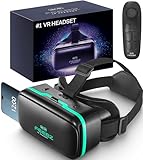
Overview: The FEEBZ 3D VR Headset for Kids 2.0 positions itself as the perfect entry point into virtual reality for young users and beginners. This phone-based headset claims broader compatibility than competitors and includes an Android remote control, making it accessible for families dipping their toes into VR without significant financial commitment.
What Makes It Stand Out: This headset distinguishes itself through its kid-centric design philosophy. The package includes curated VR content specifically for beginners, a “how to use” tutorial link, and larger lenses with enhanced face padding—addressing common pain points for first-time users. The included Android remote adds interaction possibilities that basic viewers lack, while the universal compatibility claim suggests fewer phone-related frustrations.
Value for Money: Priced in the budget tier, this headset delivers exceptional value for uncertain beginners. It eliminates the research burden by bundling content and instructions, effectively costing less than a family movie outing. While it can’t match premium standalone headsets, it outperforms cardboard alternatives with its durability, comfort features, and included accessories.
Strengths and Weaknesses: Strengths include broad phone compatibility, beginner-friendly resources, comfortable padding, included remote, and kid-appropriate content curation. Weaknesses involve dependence on smartphone quality for experience, limited immersive capabilities compared to standalone units, basic build quality, and potential content limitations for advanced users.
Bottom Line: The FEEBZ 2.0 is an ideal starter kit for families with children curious about VR. It removes barriers to entry with thoughtful inclusions and comfortable design, making it a smart, low-risk investment for beginners before committing to expensive ecosystems.
2. Meta Quest 3S 128GB | VR Headset — Thirty-Three Percent More Memory — 2X Graphical Processing Power — Virtual Reality Without Wires — Access to 40+ Games with a 3-Month Trial of Meta Horizon+ Included

Overview: The Meta Quest 3S represents the cutting edge of consumer virtual reality, delivering a completely wireless standalone experience powered by the Snapdragon XR2 Gen 2 processor. With 128GB of storage and 8GB RAM, this headset eliminates cables while offering performance previously reserved for PC-tethered systems, targeting serious gamers and VR enthusiasts.
What Makes It Stand Out: The Quest 3S’s standout feature is its raw power—twice the graphical processing capability of its predecessor enables stunning visuals and lightning-fast load times. The 33% memory increase to 8GB ensures smooth multitasking and future-proofs the device. The included 3-month Meta Horizon+ trial grants instant access to 40+ premium games, creating immediate value. Complete wireless freedom combined with mixed reality capabilities that blend virtual and physical spaces sets a new benchmark.
Value for Money: At premium pricing, the Quest 3S justifies its cost through standalone convenience and included software worth hundreds of dollars. It eliminates the hidden expenses of gaming PCs or consoles while delivering comparable experiences. For committed users, the total cost of ownership beats PC VR setups requiring expensive graphics cards and sensors.
Strengths and Weaknesses: Strengths include exceptional wireless performance, powerful Snapdragon XR2 Gen 2 processor, generous RAM, extensive content library, intuitive mixed reality features, and solid build quality. Weaknesses comprise premium pricing, approximately 2-hour battery life limiting marathon sessions, mandatory Facebook/Meta account integration, and storage that may prove insufficient for heavy users.
Bottom Line: For serious VR enthusiasts ready to invest in top-tier experiences, the Meta Quest 3S is unmatched. Its wireless freedom, processing power, and content ecosystem make it the definitive choice for those prioritizing performance over budget constraints.
3. VR Headset for Phone with Controller, Anti-Blue Lens PD & Fl Adjustable Virtual Reality Goggles Set for Kids and Adults, Compatible with iPhone 16/15/14/13/12 Samsung Android 4.5-6.7"

Overview: This VR Headset for Phone with Controller targets users seeking a customizable, mid-tier virtual reality experience without breaking the bank. Designed for both kids and adults, it transforms compatible smartphones into VR devices through adjustable lenses and head straps, emphasizing comfort and visual protection with anti-blue light technology.
What Makes It Stand Out: The headset’s precision adjustments set it apart—separate PD (pupillary distance) and FL (focal length) controls allow users to fine-tune optics for their specific vision needs, a feature rarely found in this price range. The included controller enhances interactivity beyond basic viewers, while anti-blue light lenses address health concerns for extended use. The extensive compatibility list covers most mainstream phones.
Value for Money: Positioned in the affordable mid-range, this headset delivers features approaching premium phone VR models at a fraction of the cost. The inclusion of a controller and advanced lens adjustments provides tangible value over basic models. However, its value diminishes if you own a large phone exceeding the 6.3-inch length limit, requiring careful compatibility verification before purchase.
Strengths and Weaknesses: Strengths include precise PD/FL adjustments for personalized viewing, comfortable adjustable headband, anti-blue light lens protection, included controller for better interaction, and broad compatibility with standard-sized phones. Weaknesses involve incompatibility with popular large phones (Pro Max models), complete dependence on smartphone screen quality, and potential app ecosystem fragmentation.
Bottom Line: This headset suits users with standard-sized phones who prioritize visual customization and eye protection. Verify your phone’s dimensions first—if compatible, it offers excellent adjustability and comfort for the price, making it a smart choice for families sharing one device.
4. DESTEK V5 VR Headset for Phone w/VR Gamepad, 128 Premium VR apps Included, Anti-Blue Eyes Protected HD Lenses, 110° FOV Virtual Reality Headsets for iPhone, Android Phone - Black

Overview: The DESTEK V5 VR Headset represents eight years of refinement in phone-based virtual reality, positioning itself as the premium choice for discerning users. With 110° field of view, anti-blue light HD lenses, and eco-friendly construction, it combines environmental consciousness with technical performance, targeting users who refuse to compromise on quality despite using smartphone VR.
What Makes It Stand Out: DESTEK’s meticulous curation of 128 hand-picked VR apps, categorized into View, Play, Teaching, and Explore, eliminates content discovery frustration. The 110° ultra-wide FOV and 92% light transmission lenses deliver exceptional visual immersion. Eco-friendly fabric and breathable padding demonstrate sustainable design, while exclusive touch buttons enable intuitive interaction without external controllers. This thoughtful integration of hardware and software creates a cohesive ecosystem.
Value for Money: While priced at the higher end for phone VR, the V5 justifies its premium through included content worth dozens of hours of entertainment and educational value. The build quality and eight-year development pedigree suggest durability that cheaper alternatives lack. For eco-conscious buyers, the sustainable materials add ethical value unmatched by plastic competitors.
Strengths and Weaknesses: Strengths include exceptional 110° field of view, curated 128-app library, effective blue light protection, eco-friendly comfortable materials, intuitive touch button controls, and refined eight-year design evolution. Weaknesses involve reliance on smartphone capabilities, premium pricing within the phone VR category, and potential obsolescence as phone designs evolve beyond compatibility.
Bottom Line: The DESTEK V5 is the definitive premium phone VR headset. If you demand the best visual experience, curated content, and sustainable construction without upgrading to standalone VR, this eight-year evolution of design delivers unmatched quality and thoughtful features for serious smartphone VR users.
5. HeroMask VR Headset + Math Games — Gift for Kids 5–12 — Multiplication, Times Tables, Addition, Mental Math & More | Award-Winning Virtual Reality Educational Toy for Birthday or Christmas

Overview: HeroMask VR Headset + Math Games carves a unique niche as an award-winning educational toy rather than a general entertainment device. Designed specifically for children ages 5–12, it leverages virtual reality to transform math learning—covering multiplication, addition, times tables, and mental math—into an engaging, game-like experience that feels like play rather than homework.
What Makes It Stand Out: This product’s educational pedigree sets it apart—games are developed with teachers to build number fluency, calculation speed, and confidence systematically. Unlike entertainment-focused VR, HeroMask targets specific learning outcomes while maintaining engagement. The included sturdy headset is purpose-built for young users, and the continuous content updates ensure evolving educational value. Its award-winning status validates the pedagogical approach.
Value for Money: As an educational investment, HeroMask delivers compelling value by combining hardware and curriculum-aligned software. It costs less than tutoring sessions while providing unlimited practice. Parents gain an educational tool disguised as a gift, offering repeated use versus one-time entertainment value. However, its single-subject focus limits versatility compared to general VR headsets.
Strengths and Weaknesses: Strengths include teacher-developed educational content, age-appropriate design, proven engagement for reluctant learners, continuous app updates, and a meaningful alternative to purely recreational toys. Weaknesses involve limited scope (math only), dependence on smartphone quality, unknown headset durability for rough child use, and lack of general VR entertainment options.
Bottom Line: HeroMask is an exceptional choice for parents prioritizing educational screen time. If your goal is making math practice enjoyable for elementary-aged children, this award-winning tool delivers uniquely. For families seeking general VR entertainment, look elsewhere—this is a specialized learning device that excels at its singular mission.
6. Meta Quest 3 512GB | VR Headset — Thirty Percent Sharper Resolution — 2X Graphical Processing Power — Virtual Reality Without Wires — Access to 40+ Games with a 3-Month Trial of Meta Horizon+ Included

Overview: The Meta Quest 3 512GB represents the pinnacle of standalone virtual reality, delivering a wire-free experience that doesn’t compromise on performance. Building upon its predecessor’s success, this headset introduces significant hardware upgrades that transform how you interact with digital worlds, making it ideal for gaming, fitness, and productivity applications.
What Makes It Stand Out: The nearly 30% resolution boost creates breathtaking 4K visuals that eliminate the screen-door effect, while the Snapdragon XR2 Gen 2 processor delivers twice the graphical power for lightning-fast load times and complex environments. The generous 512GB storage accommodates extensive game libraries, and the included three-month Meta Horizon+ trial provides instant access to 40+ premium titles without additional investment.
Value for Money: At its premium price point, the Quest 3 justifies the investment by eliminating the need for an expensive gaming PC or external sensors. Compared to tethered alternatives like PSVR2, the standalone freedom and expanding ecosystem offer superior long-term value, though the battery limitation means serious gamers may want a backup power solution.
Strengths and Weaknesses:
- Strengths: Exceptional visual clarity, powerful wireless performance, extensive game library, intuitive setup, and robust build quality.
- Weaknesses: 2+ hour battery life limits marathon sessions, requires mandatory Meta account linking, and the default strap may cause discomfort during extended play.
Bottom Line: For VR enthusiasts seeking cutting-edge technology without wires, the Meta Quest 3 512GB delivers an unmatched standalone experience that justifies its premium positioning.
7. TECKNET VR Headset for Phone, Virtual Reality Headsets with HD 110°FOV Anti-Blue Light Lenses & Adjustable Gears, 3D VR Headset for Kids Compatible iPhone Samsung Android 4.7-7.2" - Black

Overview: The TECKNET VR Headset offers an affordable entry into virtual reality by transforming your existing smartphone into a 3D entertainment hub. Compatible with devices ranging from 4.7 to 7.2 inches, this lightweight viewer prioritizes comfort and eye safety for extended viewing sessions, making it particularly suitable for children and casual users exploring immersive content.
What Makes It Stand Out: Weighing merely 268g, the ergonomic design features an adjustable headband and breathable foam padding that accommodates all head sizes comfortably. The anti-blue light lenses protect against eye strain while supporting users with up to 600° myopia without requiring glasses, making it uniquely accessible for vision-impaired users seeking a glasses-free experience.
Value for Money: This budget-friendly option costs a fraction of standalone headsets, making it ideal for families and casual users testing VR waters. While performance depends entirely on your phone’s capabilities, the build quality and comfort features punch well above its price class, delivering unexpected durability.
Strengths and Weaknesses:
- Strengths: Ultra-lightweight construction, comprehensive eye protection, wide smartphone compatibility, myopia-friendly adjustments, and user-friendly design.
- Weaknesses: Lacks built-in sensors or controllers, experience quality varies by phone, limited to passive content, and marketing copy contains repetitive information.
Bottom Line: Perfect for kids and VR newcomers, the TECKNET headset provides a comfortable, safe introduction to 3D content without breaking the bank.
8. 3D VR Headset, Virtual Reality Glasses Headset Helmets, Compatible with 5.0-7.0 inch with Controller, for Mobile Games & Movies(Black)

Overview: This 3D VR Headset bridges the gap between basic phone viewers and advanced VR systems by including a handheld controller for enhanced interaction. Designed for 5.0-7.0 inch smartphones, it focuses on delivering adjustable optics and basic media controls for a more engaging mobile VR experience that works for both gaming and movie viewing.
What Makes It Stand Out: The inclusion of a controller allows users to play/pause music and adjust volume without removing the headset, while independent focal distance and object distance adjustments accommodate varying vision needs. The extensive compatibility list covers most iPhone and Samsung models, ensuring broad usability across popular devices from multiple generations.
Value for Money: Positioned in the mid-range phone VR category, this headset offers reasonable value by bundling a controller at a price point only slightly above basic viewers. However, the controller’s AAA battery requirement (not included) adds hidden costs and inconvenience that budget-conscious buyers should factor into the total investment.
Strengths and Weaknesses:
- Strengths: Controller enhances interaction, wide smartphone compatibility, optical adjustments reduce distortion, comfortable padding, and straightforward setup process.
- Weaknesses: Controller requires separate battery purchase, tracking remains basic, experience depends on phone quality, and build quality may not withstand heavy use.
Bottom Line: A solid step-up from entry-level phone VR, this headset suits users wanting basic controls without investing in a standalone system.
9. Virtual Reality Goggles, 3D VR Glasses Adjustable VR Virtual Reality Headset with Wide Angle Lens, Universal 3D VR Headset for Kids Adults, HD Goggles for Phone Movies Games

Overview: These Virtual Reality Goggles prioritize visual fidelity for smartphone-based VR, targeting users who want an immersive viewing experience without the premium cost of standalone headsets. Supporting phones from 4.7 to 7.2 inches, it emphasizes lens quality and field-of-view optimization for both gaming and cinematic content consumption.
What Makes It Stand Out: The double spherical optical lenses promise high-definition image restoration with a 100-degree wide-angle lens that eliminates the “black box effect” for a more immersive cinematic experience. Myopia support up to 600° and independent lens adjustments cater to visually impaired users seeking a glasses-free solution, while the 360-degree panoramic view enhances spatial presence.
Value for Money: This competitively priced headset offers excellent value for movie enthusiasts, delivering visual enhancements that rival more expensive phone VR options. The focus on optics over controllers keeps costs down while maximizing the viewing experience for passive content, making it a smart choice for entertainment-focused users.
Strengths and Weaknesses:
- Strengths: Superior lens clarity, wide field of view, myopia-friendly design, universal phone compatibility, and effective black box reduction for immersive viewing.
- Weaknesses: No included controller limits interaction, performance tied to phone capabilities, passive experience only, and limited documentation for setup nuances.
Bottom Line: Ideal for 3D movie watchers and casual gamers, these goggles deliver impressive visuals at an accessible price point.
10. KIWI design K4 Head Strap, VR Headset Accessories for Meta Oculus Quest 3/3S, Non-Battery & Enhanced Support & Adjustable & Comfort Strap Gift for Kids and Adults

Overview: The KIWI design K4 Head Strap is a comfort-focused accessory specifically engineered for Meta Quest 3 and 3S headsets, addressing the common discomfort issues of the standard strap. This third-party upgrade targets users seeking extended play sessions without facial pressure or slippage during active gaming or workouts.
What Makes It Stand Out: The unique weight-balancing design distributes the 233g mass evenly across your head, eliminating facial strain through an enlarged rear headrest. Premium memory foam cushioning wrapped in soft PU leather provides all-day comfort, while the 52-degree hinge and upgraded dial enable tool-free adjustments in seconds for any head size, perfect for households with multiple users.
Value for Money: As a budget-friendly alternative to Meta’s official Elite Strap, the K4 delivers comparable comfort improvements at a significantly lower price. For Quest 3 owners frustrated with the default strap, this represents one of the best cost-to-comfort ratios on the market, though it lacks the battery option of premium alternatives.
Strengths and Weaknesses:
- Strengths: Excellent weight distribution, premium comfort materials, quick-adjust mechanism, secure fit during intense movement, and perfect Quest 3/3S compatibility.
- Weaknesses: No integrated battery option, limited to specific headset models, and adds slight weight to overall setup.
Bottom Line: An essential upgrade for Quest 3 users, the K4 strap transforms comfort without draining your wallet, making it a must-have accessory for serious VR enthusiasts.
Understanding VR Technology for Younger Users
What Makes a VR Headset Kid-Friendly?
Kid-friendly VR headsets prioritize safety, comfort, and simplicity above all else. These devices typically feature lighter-weight designs that reduce neck strain during extended sessions, with materials that are hypoallergenic and easy to clean after enthusiastic use. The interface should offer intuitive navigation that doesn’t require complex setup processes, allowing younger users to jump into experiences without constant parental intervention. Look for headsets with built-in safety mechanisms like automatic boundary detection that prevents collisions with real-world objects, and proximity sensors that pause content if the device is removed improperly.
Age Recommendations and Safety Guidelines
Manufacturers have refined their age guidelines significantly by 2026, with most recommending VR use begin around age 7-8 for supervised, short sessions. The key isn’t just chronological age but developmental readiness—can your child follow safety instructions, recognize when they feel uncomfortable, and communicate their experience effectively? Many platforms now include built-in age verification systems that restrict access to content libraries based on the user’s profile, while parental dashboards allow you to set time limits and monitor usage patterns without hovering over their shoulder.
The Evolution of VR for Children by 2026
The VR landscape has matured dramatically, moving beyond clunky prototypes to sleek, family-oriented devices. Modern headsets for younger users feature improved weight distribution that places less pressure on developing facial structures, while advanced display technology has significantly reduced the screen-door effect that could cause eye strain. Wireless connectivity has become standard, eliminating tripping hazards from cables, and passthrough cameras now offer crystal-clear views of the real world with a simple button press—perfect for checking in with parents without removing the entire headset.
Key Features to Evaluate in Youth VR Headsets
Display Quality and Resolution Requirements
For younger eyes, resolution matters more than you might think. While teens might appreciate cutting-edge pixel density for immersive gaming, children benefit from displays that minimize eye fatigue through higher refresh rates (at least 90Hz) and reduced blue light emission. The sweet spot for kids’ headsets typically falls between 2K-3K per eye, balancing visual clarity with processing power that won’t drain batteries quickly. Consider headsets with adjustable brightness settings that automatically adapt to ambient lighting, preventing harsh brightness differences that can cause discomfort.
Comfort and Ergonomics for Growing Bodies
A headset that fits perfectly today might cause pressure points six months from now. Prioritize models with adjustable headbands that accommodate growth spurts and interchangeable face cushions in multiple sizes. The weight should sit primarily on the forehead and crown rather than cheekbones, which are more sensitive in younger users. Some advanced models now include memory foam padding that molds to facial contours while maintaining hygiene through antimicrobial treatments—essential for devices shared among siblings.
Adjustable Head Straps and IPD Settings
Interpupillary distance (IPD) adjustment isn’t just a nice-to-have; it’s crucial for preventing headaches and ensuring proper 3D depth perception. Children’s IPD measurements can vary significantly, so look for headsets offering physical sliders rather than software-only adjustments, with ranges starting as low as 55mm. Straps should feature multiple adjustment points—top strap, side straps, and rear cradle—to distribute weight evenly. Quick-release mechanisms allow fast removal during supervised play, while dial-based tightening systems let users find their perfect fit without adult help.
Controller Design and Accessibility
Youth-oriented controllers have evolved beyond miniature adult versions. The best options feature ergonomic grips sized for smaller hands, with button layouts that don’t require excessive thumb stretching. Haptic feedback should be adjustable or disableable, as intense vibrations can overwhelm sensitive users. For teens interested in creative applications, look for controllers with pressure-sensitive triggers and precise tracking that supports artistic expression. Some systems now offer hand-tracking capabilities that eliminate controllers entirely for certain experiences, reducing the learning curve for younger children.
Battery Life Considerations
Nothing kills VR excitement faster than a dead battery mid-adventure. For kids, aim for headsets offering at least 2-3 hours of active use per charge, with standby modes that preserve power during breaks. Teens using VR for social experiences or content creation need 4+ hour battery life. Consider models with hot-swappable battery packs or those that can operate while charging via portable power banks—perfect for long car trips or family vacations where outlets are scarce.
Safety First: Health and Wellness Considerations
Managing Screen Time and Digital Eye Strain
Even with improved technology, the 20-20-20 rule remains golden: every 20 minutes, take a 20-second break to look at something 20 feet away. Many headsets now include built-in timers that gently fade experiences at predetermined intervals, encouraging natural rest periods. Blue light filtering has become sophisticated, with some devices automatically increasing filtration as evening approaches to protect circadian rhythms. Parental dashboards can enforce these breaks remotely, locking the device for 5-10 minutes to ensure compliance.
Motion Sickness Prevention Strategies
Younger users are often more susceptible to VR-induced nausea, making comfort features essential. Look for headsets with high refresh rates (120Hz is ideal), low persistence displays, and advanced motion smoothing technology. Some devices include “comfort mode” settings that reduce peripheral vision during movement or add virtual nose/horizon lines that anchor the visual field. Always start with stationary experiences before progressing to room-scale movement, and ensure your child knows to remove the headset immediately if they feel queasy—no pushing through discomfort.
Physical Space Requirements for Safe Play
Clear play space is non-negotiable. Most youth VR experiences require a minimum 6.5 x 6.5 feet area, but more active games need 10 x 10 feet or larger. Modern headsets feature sophisticated guardian systems that map your room in 3D, creating invisible walls that appear as grid patterns when approached. For apartment dwellers, consider headsets with “seated mode” optimizations that deliver rich experiences within arm’s reach. Some families designate specific VR rooms or use pop-up play mats with boundary markings that help children internalize their limits.
Parental Controls and Content Filtering
Comprehensive parental controls extend beyond simple time limits. Advanced systems allow you to whitelist specific apps, block in-app purchases entirely, and monitor who your teen interacts with in multiplayer spaces. Look for headsets with separate parent and child profiles, where adult accounts can approve new downloads remotely via smartphone apps. Content rating systems should integrate with international standards like PEGI and ESRB, while AI-powered filters can scan user-generated content in real-time, flagging inappropriate language or behavior before it reaches your child.
Blue Light Exposure and Sleep Impact
Evening VR sessions can disrupt sleep patterns if not managed properly. Premium headsets now include circadian-aware lighting that gradually shifts color temperature toward warmer tones after sunset. Some devices automatically disable VR access within 1-2 hours of a set bedtime, helping establish healthy routines. For teens who use VR for homework or creative projects, consider headsets with “productivity modes” that minimize blue light while maintaining color accuracy—perfect for virtual art classes or 3D modeling assignments.
Content Ecosystem and Educational Value
Age-Appropriate Games and Applications
The best VR platforms offer curated content libraries organized by age brackets, with clear descriptions of gameplay mechanics and potential triggers. For elementary-aged children, focus on exploration and puzzle games that encourage critical thinking without time pressure. Middle schoolers benefit from collaborative building experiences and gentle adventure narratives. Teens can handle more complex simulations, but look for platforms that balance entertainment with educational titles covering history, science, and creative arts. Always preview content yourself or rely on trusted parent review communities before granting access.
Educational VR Experiences for Learning
VR has revolutionized homeschooling and supplemental education. By 2026, immersive field trips to ancient civilizations, interactive molecule building, and virtual dissections are standard offerings. The key is finding headsets that support educational platforms with curriculum-aligned content and progress tracking. Some systems integrate directly with school district accounts, allowing teachers to assign VR homework. For younger children, look for experiences that blend physical movement with learning—like counting games that involve reaching for virtual objects—reinforcing kinesthetic learning styles.
Social Features and Multiplayer Safety
Teens especially crave social connection in VR, but safety can’t be compromised. Evaluate platforms with robust friend systems that require mutual approval and parent verification for under-16 users. Voice chat should offer granular controls: mute all by default, allow only approved friends, or enable AI moderation that transcribes and filters conversations in real-time. Virtual hangout spaces designed specifically for teens include moderators and reporting tools, while some systems restrict avatar interactions to prevent inappropriate contact, using gestures instead of free-form movement.
Content Creation Tools for Teens
For creatively inclined teenagers, VR becomes a canvas for 3D art, animation, and game design. Look for headsets that include or support intuitive creation suites with extensive tutorial libraries. These tools should allow exporting creations to share with family or include in college portfolios. Some platforms host teen creator communities with mentorship programs and safe feedback channels. The ability to import personal photos or drawings into VR projects adds a layer of personalization that keeps teens engaged while developing valuable digital skills.
Offline vs. Online Content Access
Not every family wants constant internet connectivity. Some headsets offer substantial offline libraries downloadable via parental accounts, perfect for travel or limited data plans. Offline mode also eliminates exposure to unexpected online interactions. However, online access unlocks the full potential of multiplayer experiences and cloud-saved progress. Consider hybrid approaches: online for supervised weekend sessions, offline for weekday use. Many devices now include “airplane mode” optimizations that maintain core functionality without connectivity, while automatically syncing progress when reconnected.
Budget Considerations and Value Assessment
Entry-Level Price Points for Beginners
Starting your VR journey doesn’t require emptying your savings. Entry-level headsets for kids typically range from $200-$400, offering core experiences without premium frills. These models often use smartphone processing power or standalone chips sufficient for educational apps and simple games. While they may lack advanced features like eye-tracking or ultra-high resolution, they provide an excellent testing ground to gauge your child’s interest and responsibility. Many include free starter content libraries, eliminating immediate additional purchases.
Premium Features Worth the Investment
Spending $600+ unlocks features that significantly enhance the experience for dedicated teen users. Premium headsets offer better displays, superior comfort for longer sessions, and access to exclusive content ecosystems. Eye-tracking enables foveated rendering that reduces processing demands while improving visual quality—particularly beneficial for users sensitive to motion issues. Advanced hand-tracking, higher refresh rates, and professional-grade content creation tools justify costs for families where VR becomes a regular part of education and entertainment.
Subscription Services and Hidden Costs
The sticker price rarely tells the full story. Many platforms require monthly subscriptions ($10-30) for premium content libraries or multiplayer access. Factor in costs for replacement face cushions ($15-25), controller batteries or charging docks ($30-50), and carrying cases ($40-60). Some educational apps charge per module or require annual licenses. Calculate the total cost of ownership over 2-3 years, including potential hardware upgrades. Look for bundles that include extended warranties and content credits, often saving 20-30% compared to à la carte purchases.
Durability and Replacement Policies
Kids break things—it’s developmental fact. Prioritize headsets with military-grade durability ratings or those specifically tested for drops from 4+ feet. Modular designs where controllers, straps, and face cushions can be individually replaced save money versus whole-unit replacement. Investigate manufacturer replacement policies: some offer discounted “oops” replacements for the first year, while others provide robust warranty extensions. Extended warranties ($50-100) often pay for themselves with active young users, covering accidental damage beyond standard defect protection.
Resale Value and Upgrade Paths
VR technology evolves rapidly. Choose brands with strong resale markets if you plan to upgrade every 2-3 years. Some manufacturers offer trade-in programs providing 30-40% credit toward newer models. Consider headsets with forward-compatible accessories—controllers and face pads that work across generations reduce future costs. For teens, platforms that allow account migration preserve purchased content and progress, making upgrades seamless rather than starting from scratch.
Setting Up the Perfect VR Space
Room-Scale vs. Stationary Experiences
Your available space dictates the VR experiences possible. Room-scale setups allow physical movement within a defined area, ideal for active games and immersive exploration. These require cleared floors, wall padding in tight spaces, and robust guardian systems. Stationary experiences work in smaller spaces, using controller-based movement or teleportation mechanics. Many headsets excel at both, automatically adjusting interface elements based on detected play area size. For families with limited space, look for “dynamic scaling” features that compress room-scale experiences into stationary footprints without losing interactivity.
Lighting and Environmental Factors
VR tracking systems perform best in evenly lit rooms without direct sunlight. Bright windows confuse sensors, while complete darkness hinders inside-out tracking. Ideal lighting is diffuse and indirect, similar to a cloudy day. Avoid rooms with mirrors or reflective surfaces that create tracking ghosts. Some advanced headsets include IR illuminators that work in near-darkness, perfect for evening sessions. For multi-purpose rooms, consider smart bulbs that automatically adjust to optimal VR lighting presets when the headset activates.
Cable Management Solutions
While wireless dominates 2026, some high-end experiences still benefit from wired connections for uncompressed video. If cables are necessary, invest in ceiling-mounted pulley systems ($30-50) that keep cords overhead and out of stepping range. For stationary setups, weighted cable stays prevent tugging. Wireless casting to nearby screens—for parental monitoring—requires stable Wi-Fi 6E networks. Some families run dedicated VR networks to avoid congestion from other smart home devices, ensuring lag-free experiences.
Storage and Maintenance Tips
Proper storage extends headset lifespan significantly. Wall-mounted stands with UV sanitizing lights ($60-80) keep devices charged and clean between uses. Controller charging stations prevent battery corrosion and ensure everything’s ready for the next session. Dust covers for lenses are non-negotiable—micro-scratches from improper cleaning ruin visual quality. Teach children the “microfiber only” rule for lenses, and store headsets away from direct heat or cold. Monthly firmware updates and lens calibration checks maintain optimal performance.
Travel-Friendly Options for Families
Vacations and family visits shouldn’t mean VR withdrawal. Compact, all-in-one headsets with carrying cases designed for backpacks make travel seamless. Battery packs that charge via USB-C allow recharging from car outlets or power banks. Offline content libraries ensure entertainment during flights or remote locations. Some headsets feature “travel mode” that disables guardian requirements, allowing use in moving vehicles (as passengers) with seated experiences. Always pack lens cleaning kits and backup straps—travel stress increases the likelihood of component failure.
Making the Final Decision
Involving Your Child in the Selection Process
Turn VR shopping into a collaborative decision that teaches research skills. Have your child create a feature wishlist, then compare how different headset categories meet those needs. Watch demo videos together and discuss which experiences excite them most. This involvement builds investment in responsible use and helps them understand why certain safety features are non-negotiable. For teens, task them with reading user reviews and summarizing pros/cons—developing critical evaluation skills they’ll use for future tech purchases.
Trial Periods and Return Policies
Never commit without a test drive. Major retailers now offer 14-30 day trial periods for VR headsets, sometimes with small restocking fees ($25-50). Use this time to assess comfort, ease of use, and genuine interest versus novelty. Test during different times of day, monitor for motion sickness, and evaluate how seamlessly the device integrates into your family’s routine. Keep all packaging pristine during trials. Some manufacturers provide “home demo kits” with prepaid return labels, removing financial risk from experiments.
Warranty and Customer Support Evaluation
Technical issues will arise, especially with young users. Research manufacturer support reputation through parent forums, not just official reviews. Premium support tiers ($50-100 annually) offer priority service, advanced replacements, and accidental damage coverage. Check response time guarantees—24/7 chat support is invaluable when a headset fails on a Saturday morning. International families need global warranty coverage and multilingual support. Extended warranties should cover not just hardware defects but also software issues and account recovery problems.
Community and User Reviews Interpretation
Navigate review landscapes carefully. Focus on reviews from verified purchasers with children in similar age brackets. Watch for patterns: if multiple reviews mention strap breakage within months, that’s a red flag. Be wary of overly enthusiastic reviews that might be sponsored, and equally skeptical of one-star reviews complaining about unrealistic expectations. Parent-specific forums and educational technology communities often provide more nuanced insights than general retail sites. Look for reviews that discuss long-term durability over 6-12 months, not just first impressions.
Future-Proofing Your Investment
VR technology cycles every 2-3 years, but a thoughtful purchase can remain relevant longer. Prioritize headsets with expandable storage, modular components, and active developer communities. Platforms that support sideloading—installing non-store apps—extend functionality beyond official lifecycles. For teens interested in tech careers, choose devices compatible with development tools like Unity or Unreal Engine, turning the headset into a learning platform for coding and design. Consider whether the ecosystem is growing or stagnating: active content development indicates continued support.
Frequently Asked Questions
What is the ideal age for a child to start using VR headsets?
Most manufacturers recommend starting at age 7-8 for supervised sessions under 30 minutes. However, developmental readiness matters more than age—your child should be able to communicate discomfort, follow safety rules, and understand the difference between virtual and real-world actions. Always consult your pediatrician if you have concerns about vision development or neurological factors.
How can I prevent motion sickness in my teen during VR gaming?
Start with stationary experiences and gradually introduce movement. Ensure the headset offers at least 90Hz refresh rate, enable comfort modes that reduce peripheral vision during motion, and enforce the 20-20-20 rule for eye breaks. Keep ginger chews or acupressure wristbands handy, and never push through nausea—symptoms typically worsen with repeated exposure during the same session.
Are there VR headsets specifically designed for educational purposes?
While most modern headsets support educational content, some prioritize learning ecosystems with curriculum-aligned apps, teacher dashboards, and classroom management tools. These often include features like progress tracking, assignment integration, and safe multiplayer environments for collaborative projects. Look for platforms partnered with educational institutions or offering certification programs.
What safety features should I absolutely not compromise on?
Non-negotiable features include reliable guardian/boundary systems, physical IPD adjustment for proper eye alignment, pass-through cameras for real-world awareness, and comprehensive parental controls that restrict content and purchases. For younger children, automatic time-limit enforcement and blue light filtering are essential. Always verify these work as advertised during the trial period.
How much space do we realistically need for VR at home?
A clear 6.5 x 6.5 feet area works for most youth content, but 10 x 10 feet unlocks full room-scale experiences. However, many excellent apps are designed for stationary or seated play requiring just arm’s length clearance. Measure your available space and choose headsets that excel in your constraints—some automatically adapt experiences to smaller footprints without losing interactivity.
Can VR headsets damage my child’s eyesight?
Current research shows no evidence of permanent eye damage from proper VR use in children over 7. In fact, some vision therapy applications use VR to treat convergence insufficiency. The key is moderation: follow the 20-20-20 rule, enforce time limits, and ensure proper IPD adjustment. If your child wears glasses, choose headsets with glasses-friendly designs or prescription lens inserts to prevent eye strain.
What’s the difference between standalone and PC-connected VR for kids?
Standalone headsets are all-in-one devices with built-in processors—perfect for younger children due to simplicity and portability. PC-connected headsets offer superior graphics and access to more complex experiences but require a gaming computer and cable management. For teens interested in content creation or high-end gaming, the PC route provides more power, while families prioritizing convenience and safety should lean standalone.
How do I monitor what my teen is doing in VR without being invasive?
Use headsets with casting features that stream their view to your phone or TV screen. Set up shared accounts where you receive activity summaries, but avoid reading private messages unless safety concerns arise. Establish trust through open conversations about online interactions, and use platform tools that alert you to new friend requests or purchases without revealing all activity details. Respect their privacy while ensuring their safety.
Will a VR headset become outdated quickly?
VR technology evolves rapidly, but a quality purchase should remain relevant for 2-3 years. Extend lifespan by choosing devices with active developer support, expandable storage, and modular accessories. Some platforms maintain backward compatibility, allowing new controllers or features to work with older headsets. For teens, devices supporting development tools stay useful as learning platforms even after newer models release.
What should I do if my child shows signs of VR addiction?
Set firm boundaries immediately: enforce daily time limits, designate VR-free days, and require completion of homework and physical activity before use. Watch for signs like irritability when not using VR, declining interest in other activities, or social withdrawal. Use parental controls to lock the device during restricted hours, and consider consulting a child psychologist if behaviors persist. Balance is key—VR should enhance, not replace, real-world experiences.