Table of Contents
The flight simulation experience on Xbox has evolved dramatically, transforming from a niche interest into a mainstream gaming phenomenon. As we navigate through 2026, the hardware ecosystem has matured to meet the demands of both casual pilots and hardcore aviation enthusiasts who want precise control without the complexity of PC setups. Whether you’re executing perfect landings in Microsoft Flight Simulator or dominating dogfights in arcade combat titles, the right flight stick can fundamentally transform your experience from frustrating to fluid.
Choosing the perfect flight stick for your Xbox console requires understanding a complex web of compatibility requirements, technical specifications, and personal playstyle preferences. The market now offers everything from compact entry-level options to elaborate HOTAS (Hands On Throttle-And-Stick) systems that would feel at home in a real cockpit. This comprehensive guide walks you through every critical consideration for 2026, helping you identify which features matter most for your aviation ambitions and budget constraints.
Top 10 Flight Sticks for Xbox
Detailed Product Reviews
1. Thrustmaster T-Flight Hotas One Flight Stick Controller for PC & Xbox Series X|S, Precision Joystick with Detachable Throttle, Realistic Flight Simulator Controller

Overview:
The Thrustmaster T-Flight Hotas One delivers an accessible entry point into hands-on flight simulation for Xbox and PC users. This modular system combines a precision joystick with a detachable throttle unit, offering adjustable resistance and comprehensive controls including a POV hat switch, responsive trigger, and multiple programmable buttons. Designed for versatility, it supports everything from commercial aviation to combat missions without requiring complex software installation.
What Makes It Stand Out:
The detachable throttle design sets this apart from fixed controllers, allowing users to position controls on a desk or use them comfortably on their lap. The plug-and-play USB connectivity eliminates software headaches, while adjustable joystick resistance lets pilots fine-tune feedback for different aircraft types. Its broad compatibility spans Xbox Series X|S, Xbox One, and Windows PCs, making it a rare true cross-platform HOTAS solution at this price point.
Value for Money:
Priced in the mid-range for entry-level HOTAS systems, it offers excellent value for beginners and intermediate simmers. Competing products often lack the detachable throttle or require separate purchases to achieve similar functionality. While premium options offer more buttons and metal construction, this provides the essential flight simulation experience without breaking the bank.
Strengths and Weaknesses:
Pros: True HOTAS configuration with detachable throttle; effortless plug-and-play setup; adjustable resistance for personalized feel; cross-platform compatibility; comfortable ergonomic design.
Cons: Plastic construction feels less premium; limited button count compared to high-end models; throttle could benefit from more resistance options; no Hall-effect sensors for ultimate precision.
Bottom Line:
The T-Flight Hotas One is the ideal starter HOTAS for Xbox pilots and PC newcomers. Its smart modular design and hassle-free setup make it easy to recommend for anyone wanting authentic flight controls without a premium investment.
2. Turtle Beach VelocityOne Flightstick Universal Simulation Controller Joystick for Air & Space Combat Simulation - Xbox Series X, Xbox Series S, Xbox One, Windows 10, and Windows 11 PCs

Overview:
The VelocityOne Flightstick positions itself as a premium universal controller for serious simulation enthusiasts. Featuring non-contact Hall-effect sensors on main axes, this joystick delivers exceptional precision without degradation over time. With 27 programmable buttons, 8 axes, an OLED flight management display, and customizable throttle/flap levers, it provides comprehensive control for both atmospheric flight and space combat simulations across Xbox and PC platforms.
What Makes It Stand Out:
The integrated OLED display is a game-changer, allowing real-time adjustments to button mapping, sensitivity curves, and dead zones without alt-tabbing out of simulators. Non-contact axes technology ensures lasting accuracy, while the rapid-fire trigger and POV hat cater to combat sim pilots. The multi-function throttle levers can be configured for various aircraft types, offering flexibility that adapts to everything from Cessnas to starfighters.
Value for Money:
This sits at the higher end of the consumer HOTAS market, justifying its price through advanced sensor technology and the unique OLED interface. While significantly more expensive than entry-level options, it undercuts premium boutique controllers while delivering comparable precision. For dedicated simmers who log hundreds of hours annually, the durability and customization features provide long-term value that cheaper alternatives cannot match.
Strengths and Weaknesses:
Pros: Hall-effect sensors ensure permanent precision; OLED display enables on-the-fly configuration; exceptional button and axis count; versatile throttle lever customization; premium build quality.
Cons: Premium pricing may deter casual users; setup complexity can overwhelm beginners; larger footprint requires substantial desk space; limited Xbox game compatibility compared to PC.
Bottom Line:
The VelocityOne Flightstick is a top-tier choice for dedicated flight sim enthusiasts who demand precision, durability, and deep customization. Its advanced features justify the investment for serious pilots, though casual users may find it overwhelming.
3. HORI HOTAS Flight Stick Designed for Xbox Series X|S, Xbox One and PC - Officially Licensed By Microsoft

Overview:
HORI’s officially licensed HOTAS brings Microsoft-certified reliability to the flight simulation market. This two-part system features separate joystick and throttle units with full HOTAS controls, offering adjustable sensitivity and advanced customization options. The integrated headset jack provides seamless audio connectivity, while the official licensing ensures guaranteed compatibility with Xbox consoles and Windows PCs. Designed for plug-and-play simplicity, it targets pilots seeking a dependable, officially supported control solution.
What Makes It Stand Out:
Microsoft’s official licensing distinguishes this from third-party alternatives, ensuring firmware updates and broad game compatibility. The integrated headset jack is surprisingly rare in HOTAS systems, eliminating cable clutter and enabling direct voice chat during multiplayer flights. Advanced sensitivity settings allow per-aircraft calibration, while the separate throttle and stick modules provide ergonomic flexibility for different seating arrangements and desk configurations.
Value for Money:
Positioned competitively against non-licensed alternatives, this offers peace of mind through official certification. While it lacks some premium features found in higher-priced competitors, the reliability and guaranteed Xbox integration deliver solid value. For console-first users wary of compatibility issues, the official license alone justifies the modest price premium over unlicensed options.
Strengths and Weaknesses:
Pros: Official Microsoft licensing ensures compatibility; integrated headset jack simplifies setup; adjustable sensitivity for tailored control; reliable plug-and-play performance; solid build quality for the price.
Cons: Fewer programmable buttons than premium models; no Hall-effect sensors; throttle lacks detents for commercial jets; limited advanced customization software; design is somewhat generic.
Bottom Line:
The HORI HOTAS is a trustworthy, officially licensed option that prioritizes compatibility and simplicity over advanced features. It’s perfect for Xbox pilots who want guaranteed support and integrated audio without paying boutique controller prices.
4. Thrustmaster TCA Captain Pack Xbox – Airbus Edition (Compatible with XBOX and PC)

Overview:
The TCA Captain Pack delivers unprecedented authenticity through official Airbus licensing, replicating the A320 sidestick and throttle quadrant with remarkable fidelity. This premium package includes a joystick with swappable head button modules and 14 remappable buttons, plus an enhanced throttle featuring built-in thrust reverser, rudder control via sidestick rotation, and iconic Airbus controls for trim, landing gear, autobrake, and parking brake. With 31 action buttons and 4 quadrant axes, it offers total immersion for Airbus enthusiasts.
What Makes It Stand Out:
Authentic Airbus replication sets this apart from generic flight sticks. The thrust reverser mechanism and lockable rudder control via sidestick rotation mirror real A320 operations. Swappable joystick head modules accommodate different grip styles, while dedicated controls for autobrake and parking brake eliminate keyboard dependency. The throttle quadrant’s iconic Airbus layout provides unparalleled immersion for commercial aviation simulation, particularly in Microsoft Flight Simulator’s A320neo.
Value for Money:
As a premium product, it commands a high price but delivers exceptional value for Airbus aficionados. The level of official licensing and mechanical authenticity is unmatched at this price point. While more expensive than general-purpose HOTAS systems, it costs far less than professional training replicas. For pilots exclusively flying Airbus aircraft, this specialized focus justifies every dollar compared to generic alternatives that lack authentic controls.
Strengths and Weaknesses:
Pros: Unmatched Airbus authenticity; official licensing from Airbus and Xbox; thrust reverser mechanism adds realism; lockable rudder axis via sidestick; high-quality construction with authentic switchgear.
Cons: Premium price limits appeal; Airbus-specific design less versatile for other aircraft; large footprint requires dedicated space; overwhelming for beginners; some buttons feel less robust than the main controls.
Bottom Line:
For Airbus enthusiasts seeking the most authentic home simulation experience, the TCA Captain Pack is unbeatable. Its specialized design and official licensing create unmatched immersion, though generalists may prefer a more versatile, less expensive option.
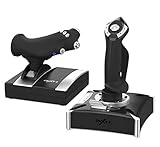
5. PXN-2119Pro Flight simulator controls Flight Stick with Vibration for xbox one/P4/pc Windows 7/8/10 (P4/xbox one need Original handle guide)(Not Support Mac Systems PS3/ PS5/xp/vista)
Overview:
The PXN-2119Pro targets budget-conscious simmers with a vibration-equipped flight stick offering multi-platform compatibility across PC, PlayStation 4, and Xbox One. This all-in-one package includes throttle and joystick units with programmable controls and force feedback capabilities. However, the product is hampered by extraordinarily complex setup procedures requiring driver downloads, original controller passthrough for consoles, and game-specific configuration that demands significant technical patience from users.
What Makes It Stand Out:
Vibration feedback is rare in this price category, adding tactile immersion that most budget sticks omit. The multi-platform support covers PC, PS4, and Xbox One, theoretically offering versatility for users owning multiple systems. The pricing significantly undercuts competitors, making it one of the few HOTAS-style controllers accessible to entry-level users with extremely limited budgets who prioritize cost above all else.
Value for Money:
While the low price appears attractive, the hidden costs in time and frustration reduce its actual value. The convoluted setup process, requiring original controller passthrough and extensive troubleshooting, may necessitate hours of configuration. Compatibility limitations with modern systems (no PS5, Xbox Series X|S, or Mac support) further diminish long-term value. Only the most technically adept users on severely constrained budgets should consider this over more refined entry-level alternatives.
Strengths and Weaknesses:
Pros: Affordable price point; vibration feedback enhances immersion; theoretically multi-platform; includes both throttle and joystick.
Cons: Nightmarishly complex setup; requires original controllers for console use; no modern system support; confusing documentation; questionable long-term durability; limited game compatibility.
Bottom Line:
The PXN-2119Pro is only suitable for tinkerers willing to wrestle with setup frustrations in exchange for minimal investment. Most users should spend slightly more for plug-and-play alternatives that offer better reliability and modern platform support.
6. Thrustmaster TCA Sidestick Airbus X Edition (Compatible with XBOX & PC)

Overview: The TCA Sidestick Airbus X Edition delivers an authentic Airbus cockpit experience for Xbox Series X|S and PC users. This officially licensed replica mirrors the A320 flight controls with precision engineering and comprehensive button mapping. Featuring 21 action buttons with tactile switches and four swappable joystick head modules, it bridges the gap between console accessibility and flight simulation authenticity.
What Makes It Stand Out: The standout feature is its genuine Airbus design language, officially licensed by both Airbus and Xbox. The ecosystem hub simplifies connectivity for existing Thrustmaster Airbus hardware, while the 14 remappable buttons offer exceptional versatility. The swappable head modules cater to different flight scenarios, from airliners to general aviation, making it uniquely adaptable for diverse simulation platforms.
Value for Money: Priced at a premium tier ($150-$180), this stick justifies its cost through official licensing and build quality. Comparable products like the Logitech X56 cost more without Airbus authenticity. For Xbox users specifically, it’s one of few high-quality options available. The modular design effectively provides multiple controllers in one, offering long-term value for dedicated flight sim enthusiasts.
Strengths and Weaknesses:
- Strengths: Authentic Airbus replica design; Excellent Xbox/PC cross-compatibility; Swappable modules increase versatility; Solid build quality with tactile button feedback; Ecosystem hub integration
- Weaknesses: Premium pricing may deter casual users; Xbox button layout can confuse pure PC sim purists; Limited to Thrustmaster ecosystem for expansion; Some users report stiffness in the Z-axis
Bottom Line: Perfect for aviation enthusiasts seeking Airbus authenticity across Xbox and PC platforms. The premium price delivers genuine replica quality and versatile functionality that cheaper alternatives cannot match.
7. Thrustmaster T-Flight Hotas X (Compatible with PC)

Overview: The T-Flight Hotas X remains a staple entry-point for PC flight simulation, offering a programmable HOTAS setup without breaking the bank. This stick-throttle combo features 12 buttons and 5 axes across both units, with internal memory to retain custom profiles. The wide hand-rest and progressive throttle lever provide comfortable extended flight sessions for beginners and intermediate users.
What Makes It Stand Out: The dual-system aerodynamic control uniquely allows rudder input via either rotating handle or progressive tilting lever, giving pilots flexibility in control preferences. The internal memory is a rare find at this price point, storing all programming even when disconnected. Its plug-and-play nature combined with deep customization makes it accessible yet powerful for PC-exclusive simulators.
Value for Money: At approximately $60-$80, this represents exceptional value for PC-only users. It undercuts competitors like the Logitech Extreme 3D Pro while offering more programmable options and separate throttle control. The internal memory eliminates software dependency, saving frustration. For budget-conscious simmers wanting HOTAS functionality without console compatibility costs, it’s nearly unbeatable.
Strengths and Weaknesses:
- Strengths: Highly affordable HOTAS solution; Internal memory preserves settings; Dual rudder input methods; Comfortable wide hand-rest; Smooth throttle action; Reliable plug-and-play performance
- Weaknesses: PC-only compatibility limits versatility; Plastic construction feels less premium; Limited button count for complex aircraft; No detachable throttle; Aging design lacks modern features
Bottom Line: An outstanding budget HOTAS for dedicated PC flight simmers. While basic in materials, its functionality and internal memory make it a smart, cost-effective choice for beginners.
8. Thrustmaster T-Flight Hotas One (XBOX One and PC) (Renewed)

Overview: This renewed T-Flight Hotas One brings official Xbox compatibility to budget-conscious pilots. The kit includes a detachable full-size throttle and joystick with 14 action buttons and 5 axes. As a certified refurbished unit, it offers the same ergonomic design and functionality as new, featuring adjustable handle resistance and wide hand-rests for comfortable long-duration flights across space and combat simulations.
What Makes It Stand Out: Being the first official Xbox joystick gives it native console integration with proper Xbox button labeling. The detachable throttle is a premium feature rarely seen at this price tier, enabling flexible positioning ideal for VR setups. The renewed status slashes costs while maintaining functionality, making console flight simulation accessible without the typical $100+ investment required for new official hardware.
Value for Money: Renewed pricing ($50-$70) makes this an exceptional entry point. New units retail around $90, so the savings are substantial. You’re getting official Xbox licensing, detachable throttle, and PC compatibility at a price point where competitors offer only basic sticks. The warranty protection on renewed units mitigates risk, delivering near-new performance for budget pricing.
Strengths and Weaknesses:
- Strengths: Significant savings as renewed; Official Xbox certification; Detachable throttle enhances ergonomics; Solid button count for the price; Works seamlessly on PC and Xbox; Adjustable resistance
- Weaknesses: Renewed units may have cosmetic wear; Shorter warranty than new; Plastic construction feels light; Throttle cable can be stiff; Limited advanced customization
Bottom Line: A fantastic value for Xbox and PC users wanting official hardware without paying full price. The renewed status is a smart compromise for casual to intermediate simmers.
9. Thrustmaster T-Flight Stick X (Compatible with Windows PC)

Overview: The T-Flight Stick X is Thrustmaster’s most accessible flight stick, designed for plug-and-play simplicity on Windows PC. This all-in-one unit combines joystick and throttle with a weighted base for stability. It features rotating handle rudder control with a locking system, rapid-fire trigger, multidirectional hat switch, and exclusive MAPPING/PRESET buttons for on-the-fly profile switching without software.
What Makes It Stand Out: The exclusive MAPPING and PRESET buttons provide instant configuration changes mid-game, a feature absent in most budget sticks. The weighted base delivers surprising stability during aggressive maneuvers. Its rotating handle with integrated lock offers authentic rudder control that can be disabled for games not requiring it. This combination of simplicity and clever functionality makes it uniquely user-friendly for beginners.
Value for Money: Typically priced under $50, this is among the most affordable quality flight sticks available. It eliminates the need for separate throttle purchases and includes internal memory for profile storage. Compared to basic no-name brands, the Thrustmaster build quality and weighted base justify the small premium. For casual flight sim fans or those testing the waters, the cost-to-feature ratio is excellent.
Strengths and Weaknesses:
- Strengths: Extremely affordable; Weighted base prevents tipping; Plug-and-play simplicity; Onboard mapping buttons; Rotating handle with lock; Internal memory; No software required
- Weaknesses: Very limited button count; Integrated throttle lacks precision; Plastic construction; Not suitable for complex aircraft; PC-only; Shows its age in design
Bottom Line: Ideal for PC newcomers wanting a stable, simple flight stick without complexity. While basic, its clever features and weighted base make it a reliable entry-level choice.
10. Thrustmaster T.Flight Full Kit X - Joystick, Throttle and Rudder Pedals for Xbox Series X|S/Xbox One/PC

Overview: The T.Flight Full Kit X delivers a complete flight simulation setup in one package, including joystick, detachable throttle, and TFRP rudder pedals with slide rails. Compatible with Xbox Series X|S, Xbox One, and PC, this plug-and-play solution provides 14 action buttons, 5 joystick axes, plus 3 additional pedal axes. The kit offers immediate immersion for pilots wanting comprehensive controls without purchasing components separately.
What Makes It Stand Out: This is the only all-in-one kit offering official Xbox compatibility with included rudder pedals—a component typically costing $100+ separately. The slide-rail pedal design provides smooth, realistic yaw control absent in stick-twist alternatives. The detachable throttle allows customized ergonomic positioning, while plug-and-play configuration ensures immediate takeoff without complex software setup across all compatible platforms.
Value for Money: Priced around $180-$200, the kit represents savings of $40-$60 versus buying throttle, stick, and pedals individually. The TFRP pedals alone retail for $100, making the bundle pricing compelling. For Xbox users especially, alternatives require mixing brands without guaranteed compatibility. The convenience of a single, guaranteed-compatible package justifies the moderate premium over entry-level options.
Strengths and Weaknesses:
- Strengths: Complete kit eliminates guesswork; Official Xbox/PC compatibility; Smooth slide-rail pedals; Detachable throttle; Plug-and-play simplicity; Good button count; Cost savings versus separate purchases
- Weaknesses: Pedals lack toe brakes; Plastic construction throughout; Throttle could be more precise; Cable management can be messy; Takes considerable desk space
Bottom Line: The best value complete flight control solution for Xbox and PC users. It sacrifices some premium build quality for affordability and convenience, making it perfect for serious beginners.
Understanding Flight Stick Compatibility with Xbox Consoles
The Evolution of Xbox Flight Sim Hardware
The journey of flight sticks on Xbox has been revolutionary. Early generations offered limited support, treating them as specialty peripherals with minimal game integration. Today’s Xbox Series X/S ecosystem fully embraces flight simulation as a core genre, with native system-level support for advanced controllers. The 2026 landscape includes standardized drivers, automatic firmware updates through the console, and deep integration with the Xbox Accessories app for customization.
Xbox-Compatible vs Universal Controllers
Not all flight sticks advertised as “Xbox-compatible” offer the same level of integration. True Xbox-native controllers carry official certification and appear seamlessly in your console’s peripheral menu. Universal models might work through adapter cables but often lack critical features like impulse trigger feedback or quick profile switching. For 2026 purchases, prioritize hardware that mentions “Xbox Series X/S native support” rather than generic PC compatibility.
Key Features to Evaluate in Modern Flight Sticks
Hall Effect Sensor Technology
Hall effect sensors have become the gold standard for precision in 2026, replacing traditional potentiometer-based systems that degrade over time. These magnetic sensors eliminate physical contact in the sensing mechanism, dramatically reducing wear and eliminating the dreaded stick drift issue. When evaluating options, look for explicit mention of Hall effect implementation in both the main stick axes and throttle components.
Force Feedback and Haptic Systems
Modern Xbox flight sticks now incorporate advanced haptic feedback that goes beyond simple rumble motors. High-end systems simulate control surface resistance, turbulence effects, and weapon recoil through sophisticated force feedback mechanisms. The Xbox’s native haptic API allows for nuanced sensations that mirror what’s happening on-screen, from the subtle buffet of approaching stall speed to the heavy resistance of aerodynamic stress during high-G maneuvers.
Button Mapping and Customization Depth
The number of accessible controls directly impacts your ability to keep hands on the stick during critical moments. Premium flight sticks for Xbox now feature 20-30 programmable inputs, including hat switches, rotary encoders, and dual-stage triggers. The depth of customization matters too—look for options that allow shift states, macros, and axis curve adjustments directly through console interfaces without requiring PC software.
Throttle Integration Options
Throttle control is arguably as important as stick precision. Integrated throttle sliders offer compact convenience, while separate throttle quadrants provide realistic twin-engine management. Some 2026 models feature modular designs where you can start with a single unit and expand to a full HOTAS setup later. Consider whether the throttle uses linear or arc motion, as this affects muscle memory development for different aircraft types.
Flight Stick Configurations for Different Play Styles
Single-Stick vs HOTAS Setups
Single-stick configurations with integrated throttles dominate the entry and mid-range markets, offering space efficiency and simpler setup. However, dedicated HOTAS systems separate these controls, enabling more realistic hand positioning and additional buttons. For combat simulation enthusiasts, HOTAS setups allow simultaneous control of pitch, roll, and throttle without compromising weapon systems access. Civil aviation fans benefit from more authentic procedural workflows.
Yoke Systems for Civil Aviation Fans
Yoke controllers replicate the control column found in most general aviation and commercial aircraft. These systems excel in Microsoft Flight Simulator for procedures like crosswind landings and precise altitude maintenance. Modern Xbox yokes feature 180-degree rotation with realistic damping, integrated rudder controls on the yoke itself, and modular throttle quadrants that can be positioned for first officer or captain configurations.
Rudder Pedals and Complete Ecosystems
No flight simulation setup feels complete without independent rudder control. While twist-grip rudder functionality remains common on sticks, dedicated pedal sets offer unparalleled realism and precision. Premium ecosystems designed for Xbox in 2026 include pedal sets with toe brakes, adjustable tension, and non-slip bases. Some even integrate with the stick’s haptics to simulate runway rumble and differential braking feedback.
Build Quality and Durability Considerations
Material Choices and Longevity
The difference between budget and premium flight sticks becomes apparent in material selection. High-end models utilize metal gimbals, steel shafts, and aluminum throttle rails that maintain precision through thousands of hours. Budget options rely on reinforced plastics that may develop play or dead zones after extended use. For 2026, consider the total cost of ownership—a durable stick might cost twice as much but last five times longer.
Spring Tension and Centering Mechanisms
The feel of returning to center defines a flight stick’s character. Progressive spring systems offer increasing resistance the further you deflect, mimicking real aircraft control feel. Some models feature interchangeable springs to match different aircraft types—light springs for agile fighters, heavy springs for stable commercial jets. Magnetic centering mechanisms provide cleaner return-to-center behavior than traditional coil springs.
Cable Management and Connectivity
Wireless flight sticks have matured significantly for Xbox, with sub-8ms latency matching wired performance. However, battery life and charging convenience remain concerns for marathon sessions. Wired options eliminate these worries but require thoughtful cable routing to avoid desk clutter. Look for detachable USB-C cables with locking mechanisms and integrated cable channels in the base for clean installations.
Precision and Accuracy Metrics
Dead Zones and Response Curves
Every flight stick has a small area around center where input doesn’t register—the dead zone. Premium 2026 models offer adjustable dead zones through software, letting you eliminate unwanted drift while maintaining fine control. Response curves determine how stick movement translates to in-game action. Linear curves work for combat, while S-curves provide better fine-control resolution near center for precise instrument flying.
Resolution and Bit Depth Explained
Modern Xbox flight sticks advertise resolution figures like 12-bit or 16-bit. This determines how many discrete positions the controller can detect across its entire range of motion. A 16-bit stick recognizes over 65,000 positions, enabling incredibly smooth control inputs. For context, 12-bit resolution (4,096 positions) remains perfectly adequate for most users, but competitive virtual pilots benefit from the granularity of higher bit depths.
Calibration and Software Support
Even the best hardware requires proper calibration. Xbox-native flight sticks should offer persistent calibration data stored in the controller’s firmware, not requiring recalibration between console restarts. The calibration process should be accessible through the Xbox Accessories app, providing visual feedback for center points, extremes, and axis alignment. Some advanced models even auto-calibrate during idle periods.
Xbox-Specific Feature Requirements
Wireless Protocols and Latency
Xbox consoles use proprietary wireless protocols that differ from standard Bluetooth. Certified wireless flight sticks connect directly like official controllers, ensuring stable connections and minimal latency. Third-party wireless options using adapters often introduce input lag or connection drops. For 2026, verify that wireless models specifically mention “Xbox Wireless” technology rather than generic 2.4GHz adapters.
Profile Switching on Console
The ability to switch between control profiles without leaving your game represents a crucial quality-of-life feature. Premium Xbox flight sticks include dedicated profile buttons that cycle through configurations stored in the hardware. This lets you instantly transition from a fighter jet setup to a commercial airliner configuration, with all button mappings, sensitivity curves, and dead zones changing seamlessly.
Game Pass Flight Sim Integration
Microsoft Flight Simulator’s presence on Game Pass means many Xbox players discover flight simulation casually. The best flight sticks for Xbox in 2026 include pre-configured profiles for all Game Pass flight titles, from realistic sims to arcade experiences. This plug-and-play approach eliminates hours of initial setup frustration, letting you focus on learning to fly rather than programming controls.
Price Tiers and What to Expect
Budget-Friendly Entry Points
Entry-level flight sticks for Xbox in 2026 typically range from $80 to $150. These models offer solid core functionality with plastic construction, integrated throttles, and 12-bit resolution. While lacking premium materials or advanced haptics, they provide authentic flight control that dramatically improves over gamepads. Expect 2-3 years of reliable service with moderate use, making them ideal for casual pilots testing the hobby.
Mid-Range Sweet Spots
The $200-350 range represents the value-performance sweet spot. Flight sticks in this tier introduce Hall effect sensors, metal components in high-stress areas, and either premium single-stick designs or basic HOTAS configurations. You’ll find excellent button counts, adjustable tension, and proper Xbox wireless connectivity. These systems satisfy serious enthusiasts without the diminishing returns of ultra-premium pricing.
Premium Professional-Grade Options
High-end Xbox flight sticks exceed $400, often reaching $600+ for complete HOTAS setups. These represent genuine simulation equipment with all-metal construction, 16-bit resolution, advanced force feedback, and modular expandability. Professional-grade options target dedicated virtual pilots who log hundreds of hours annually. The investment pays dividends in durability, precision, and immersion that justifies the cost for committed enthusiasts.
Setting Up Your Flight Stick for Optimal Performance
Mounting Solutions and Desk Clamps
A flight stick’s performance depends heavily on stability. Integrated desk clamps should accommodate various surface thicknesses and include protective padding. Some models offer optional mounting plates for drilling permanent installations. For 2026, look for quick-release systems that let you easily store the stick when not in use without losing your precise positioning adjustments.
Ergonomic Positioning
Proper ergonomics prevent fatigue during long flights and improve control precision. Your stick should position your forearm parallel to the floor with a relaxed 90-degree elbow bend. The throttle should be reachable without shoulder strain. Premium flight sticks include adjustable height and angle mechanisms, while budget models require careful desk and chair height matching for optimal comfort.
In-Game Sensitivity Tuning
Even perfect hardware needs software tuning. Xbox flight simulators offer extensive sensitivity adjustments that work synergistically with your stick’s physical characteristics. Start with linear response curves and adjust based on your aircraft type—lower sensitivity for stable commercial jets, higher for responsive fighters. Use the game’s built-in control test ranges to verify smooth axis response across the full range of motion.
Troubleshooting Common Xbox Flight Stick Issues
Connection and Recognition Problems
If your console fails to recognize your flight stick, first verify firmware compatibility through the Xbox Accessories app. Try different USB ports, as front-facing ports sometimes provide insufficient power. For wireless models, re-pairing through the console’s device menu often resolves intermittent connection issues. Keep your console’s system software updated, as Microsoft continuously improves peripheral support.
Drift Calibration Fixes
Despite Hall effect sensors minimizing drift, mechanical centering can shift over time. Most Xbox flight sticks include a hardware calibration sequence—typically holding specific buttons during connection. The Xbox Accessories app provides visual drift indicators and dead zone adjustments to compensate. If drift persists after calibration, check for physical obstructions or loose components in the gimbal mechanism.
Button Mapping Conflicts
Complex flight sticks can exceed Xbox’s traditional button limits, causing mapping conflicts in some older games. Modern titles handle extended input devices properly, but legacy compatibility modes might be necessary. Create separate profiles that limit active buttons for problematic games. The Xbox Accessories app’s button test feature helps identify which inputs register correctly in each compatibility mode.
Future-Proofing Your 2026 Purchase
Next-Gen Xbox Considerations
While Xbox Series X/S remain current, industry rumors suggest next-generation hardware may arrive within your flight stick’s lifespan. Premium manufacturers have begun designing with forward compatibility in mind, using firmware-upgradable controllers and standardized connection protocols. Look for brands with strong track records of supporting hardware across console generations, often indicated by multi-generation compatibility statements.
Firmware Update Policies
Active firmware support extends your flight stick’s useful life significantly. Check manufacturer policies on update frequency and distribution methods. The best options update directly through the Xbox console, while others require PC connections. Investigate community forums to gauge how quickly manufacturers address bugs or add features for new game releases. A stagnant firmware history suggests limited long-term support.
Community and Developer Support
Vibrant user communities create and share control profiles, troubleshooting tips, and modifications. Manufacturers that actively engage with these communities typically offer better long-term value. Developer partnerships ensure new flight simulation titles launch with native support for popular hardware. Before purchasing, search community forums and social media to assess the ecosystem surrounding any flight stick you’re considering.
Frequently Asked Questions
Will any flight stick work with my Xbox Series X/S?
No, only flight sticks specifically designed with Xbox certification will function properly. Standard PC flight sticks lack the necessary firmware and security chips to communicate with Xbox consoles. Always verify “Xbox Series X/S Compatible” certification before purchasing.
Do I need a separate throttle, or is an integrated one sufficient?
For beginners, integrated throttles provide excellent value and save space. However, dedicated throttle quadrants offer more realistic control, additional buttons, and better ergonomics for serious simulation. Consider upgrading to a separate throttle if you log more than 10 hours weekly or fly complex aircraft.
How important is wireless connectivity for flight sticks?
Modern wireless flight sticks offer performance virtually identical to wired models, with latency under 8ms. The convenience of wireless matters most for living room setups or multi-purpose gaming spaces. For dedicated simulation desks, wired connections provide reliability without battery concerns.
Can I use rudder pedals with any Xbox flight stick?
Only flight sticks from the same ecosystem typically support proprietary rudder pedal connections. However, some pedal sets connect directly to the Xbox as separate controllers. Verify compatibility in product specifications, as mismatched brands often lack proper axis calibration integration.
What resolution do I actually need for casual flight simming?
12-bit resolution (4,096 positions) provides more than enough precision for casual players. You’ll only benefit from 16-bit resolution if you’re performing competitive formation flying, precision aerobatics, or using the hardware for pilot training supplement.
How long should a quality flight stick last with regular use?
Premium flight sticks with Hall effect sensors and metal construction should last 5-7 years of regular use. Budget models typically provide 2-3 years before developing noticeable wear. Proper storage and avoiding aggressive handling significantly extend lifespan regardless of tier.
Can I share one flight stick between multiple Xbox profiles?
Yes, Xbox-native flight sticks store their configuration in the hardware itself, not in individual profiles. Each family member can create their own control profiles in games, and the stick’s button mappings remain consistent across all console accounts.
Are force feedback flight sticks worth the premium price?
Force feedback dramatically increases immersion and provides valuable tactile information about aircraft behavior. For combat simulation enthusiasts, it’s transformative. However, civil aviation fans may find the premium harder to justify, as the effects are subtler in airliner operations.
What maintenance does a flight stick require?
Minimal maintenance suffices for most users. Occasionally clean the grip with mild soap solution, check mounting screws for tightness, and update firmware. Avoid eating or drinking near the controller, as debris in the gimbal mechanism causes the most common performance issues.
Will my flight stick work with cloud gaming on Xbox?
Xbox Cloud Gaming currently supports official Xbox controllers only. Most certified flight sticks don’t function through cloud streaming services. For flight simulation, local console installation remains necessary to utilize specialized flight hardware properly.
See Also
- 10 Premium Flight Sticks for Hardcore Sim Enthusiasts (Worth the Investment)
- Top 10 Best Flight Sticks for PC Flight Simulators in 2026
- How to Solve Input Lag with the 10 Best Responsive Flight Sticks in 2026
- Stop Wasting Time Calibrating with the 10 Best Adjustable Flight Sticks This Year
- 10 Best Budget Flight Sticks Under $100 for Casual Gamers in 2026