Table of Contents
Diving into flight simulation for the first time feels like stepping into the cockpit of endless possibilities. Whether you’re dreaming of piloting commercial airliners across continents or executing barrel rolls in agile fighter jets, your flight stick becomes the crucial interface between your ambitions and the virtual skies. As we look toward 2026, the landscape of entry-level flight simulation hardware has evolved dramatically, offering newcomers an unprecedented balance of affordability, precision, and immersive features that were once reserved for professional setups.
The modern flight stick market can feel overwhelming with its technical specifications and feature sets, but understanding what truly matters for your first purchase will save you both money and frustration. This comprehensive guide cuts through the marketing noise to focus on the core elements that make a flight stick perfect for beginners, helping you make an informed decision that grows with your skills rather than limiting them. We’ll explore everything from sensor technology to ergonomic design, ensuring your maiden voyage into flight simulation is smooth, enjoyable, and built on solid hardware fundamentals.
Top 10 Flight Sticks for Beginners
Detailed Product Reviews
1. Thrustmaster T-Flight Hotas X (Compatible with PC)

Overview:
The T-Flight Hotas X represents Thrustmaster’s entry-level flight simulation solution, offering a complete hands-on throttle-and-stick setup for PC users. With 12 programmable buttons and 5 axes, it provides essential controls for civilian and combat flight sims without overwhelming newcomers. The wide hand-rest and adjustable resistance make extended missions comfortable.
What Makes It Stand Out:
Its dual-system rudder control is unique at this price point—pilots can choose between rotating the joystick handle or using the progressive tilting lever. The internal memory stores your configurations directly on the device, eliminating the need to reprogram when switching between computers. This self-contained profile system is rare in budget peripherals.
Value for Money:
Positioned as a budget champion, this unit delivers full HOTAS functionality for roughly half the cost of mid-tier alternatives. While it lacks the precision of premium models, it includes features like adjustable resistance and programmable macros that competitors often reserve for higher-priced offerings. It’s an ideal first investment before committing to expensive gear.
Strengths and Weaknesses:
Strengths include exceptional affordability, comfortable ergonomics, self-contained memory, and versatile rudder implementation. Weaknesses involve dated plastic construction, limited button count for complex aircraft, and less precise potentiometer sensors compared to modern Hall Effect alternatives. The throttle action can develop a notchy feel over extended use.
Bottom Line:
Perfect for beginners testing flight simulation waters or budget-conscious enthusiasts. It reliably covers the fundamentals, though serious pilots will eventually crave upgrades. For casual combat and civilian simming, it’s an unbeatable value proposition.
2. Thrustmaster T-Flight Hotas One Microsoft Flight Simulator 2024 Collector’s Edition – Flight Stick & Throttle Controller for Xbox Series X|S & PC, Official Flight Simulator Controller

Overview:
The T-Flight Hotas One Collector’s Edition is Thrustmaster’s officially licensed solution for Microsoft Flight Simulator 2024, delivering seamless plug-and-play integration with Xbox Series X|S and PC. With 10-bit precision across 5 axes and 14 action buttons, it bridges the gap between casual and serious simulation. The ergonomic design supports extended flights without fatigue.
What Makes It Stand Out:
Official MSFS 2024 branding ensures native compatibility and optimized button mapping out of the box. The detachable throttle module offers unprecedented flexibility—use it attached on a desk or separately on your lap for couch gaming. Its dual rudder system provides both Z-axis twist and a dedicated throttle lever, accommodating different aircraft types authentically. The rapid-fire trigger adds combat sim versatility.
Value for Money:
At a mid-range price point, you’re paying for official licensing and Xbox certification rather than premium sensors. It costs 30-40% more than the standard Hotas One but includes exclusive branding and pre-configured profiles. For Xbox sim pilots, this is the most cost-effective officially supported option available, eliminating compatibility headaches.
Strengths and Weaknesses:
Strengths include instant Xbox/PC recognition, modular design, versatile rudder control, and beginner-friendly setup. Weaknesses include plastic construction that feels less substantial than premium alternatives, limited button count for complex airliners, and potentiometer sensors that may develop dead zones over time. The throttle cable could be longer.
Bottom Line:
The definitive choice for Xbox flight simmers wanting official MSFS 2024 integration. PC users might find better value in non-licensed alternatives, but the plug-and-play convenience and collector’s appeal make it a compelling mid-tier option for platform-hopping pilots.
3. Thrustmaster T-Flight Stick X (Compatible with Windows PC)

Overview:
The T-Flight Stick X is a streamlined joystick solution for PC pilots seeking simplicity without sacrificing core functionality. This single-unit controller combines a precise joystick with an integrated throttle lever, making it ideal for desktop setups where space is limited or for pilots who prefer a minimalist approach. The wide hand-rest supports comfortable extended sessions.
What Makes It Stand Out:
The exclusive MAPPING and PRESET buttons allow on-the-fly profile switching without alt-tabbing from your sim—a feature rarely seen even in premium devices. Its rotating handle with integrated locking system provides rudder control when needed, while the weighted base ensures stability during intense maneuvers. The multidirectional hat switch enhances situational awareness.
Value for Money:
As one of the most affordable quality joysticks available, it delivers surprising capability for its price. You’re getting programmable buttons, adjustable resistance, and internal memory at a fraction of HOTAS system costs. For space sims or casual flight enthusiasts, it represents maximum functionality per dollar spent, requiring minimal desk real estate.
Strengths and Weaknesses:
Strengths include rock-solid stability from the weighted base, instant plug-and-play installation, clever mapping system, and space-saving design. The primary weakness is the lack of a separate throttle unit, limiting immersion and control finesse. The integrated throttle lever offers less travel and precision than dedicated units, and the button count is modest for complex aircraft like airliners.
Bottom Line:
An excellent entry point for newcomers or a reliable backup for veterans. It excels in space sims and casual civilian flying but falls short for serious study-level simulation. Buy this for simplicity and value, not for comprehensive realism.
4. Thrustmaster T-Flight Hotas One Flight Stick Controller for PC & Xbox Series X|S, Precision Joystick with Detachable Throttle, Realistic Flight Simulator Controller

Overview:
The T-Flight Hotas One is Thrustmaster’s versatile HOTAS solution for both Xbox Series X|S and PC, offering realistic flight control without platform exclusivity. This modular system combines a precision joystick with a detachable throttle, delivering authentic aircraft handling across multiple simulation titles. The ergonomic design accommodates various hand sizes comfortably.
What Makes It Stand Out:
Its plug-and-play compatibility across Xbox and PC ecosystems makes it uniquely flexible for households with multiple platforms. The detachable throttle design adapts to various ergonomic situations—from desktop cockpits to living room setups—while maintaining stable performance. The adjustable resistance caters to different aircraft types, from light props to heavy jets, enhancing immersion.
Value for Money:
This standard edition delivers nearly identical functionality to the Collector’s Edition at a lower price, minus the MSFS 2024 branding. You’re saving approximately 25% while retaining the same 10-bit precision, button layout, and build quality. For PC-only users, it competes directly with budget HOTAS systems while adding Xbox compatibility as a valuable bonus feature.
Strengths and Weaknesses:
Strengths include cross-platform versatility, modular design, straightforward setup, and adequate button count for most general aviation and combat scenarios. Weaknesses mirror its Collector’s Edition sibling: plastic construction feels toy-like, potentiometer sensors lack long-term reliability of contactless alternatives, and the throttle cable is frustratingly short. The base could be heavier for stability during aggressive inputs.
Bottom Line:
A smart choice for simmers wanting Xbox/PC flexibility without paying the licensing premium. It delivers solid performance for the price, though discerning pilots should consider investing in higher-grade sensors. Ideal for beginners and intermediate users across both platforms.
5. Honeycomb Foxtrot Aviation Stick - flight stick for flight simulation, premium gimbal mechanism, 16bit Hall Effect Sensors, ambidextrous design, compatible with MSFS 2024/2020 for PC & Mac

Overview:
The Honeycomb Foxtrot Aviation Stick represents the premium tier of flight simulation hardware, engineered for discerning pilots who demand precision and durability. Featuring a sophisticated aluminum and glass-fiber reinforced gimbal with 16-bit Hall Effect sensors, this ambidextrous stick delivers professional-grade accuracy for MSFS 2024/2020 and other platforms. Its construction rivals commercial training devices.
What Makes It Stand Out:
The contactless Hall Effect sensors provide sub-millimeter precision without the wear and dead zones plaguing potentiometer-based sticks. Its ambidextrous design is genuinely ergonomic for both left and right-handed pilots, not merely reversible. The linear, detent-free movement mimics real aircraft control columns, while the rotary panel and dual hat switches offer extensive control options for complex aircraft systems.
Value for Money:
Positioned at 2-3 times the cost of Thrustmaster’s offerings, the Foxtrot justifies its premium through exceptional build quality and sensor precision. For serious simmers pursuing real-world training or aerobatic proficiency, the investment pays dividends in accuracy and longevity. Casual users will find diminishing returns compared to mid-tier options. It’s a long-term investment, not an impulse purchase.
Strengths and Weaknesses:
Strengths include unparalleled sensor precision, robust metal construction, thoughtful ambidextrous ergonomics, and smooth gimbal action. The 16-bit resolution captures minute control inputs essential for realistic landings. Weaknesses include premium pricing, lack of included throttle quadrant requiring separate purchase, and steeper learning curve for button mapping. Mac compatibility is limited compared to PC, and it’s overbuilt for casual arcade sims.
Bottom Line:
An enthusiast-grade investment that elevates simulation fidelity dramatically. Essential for serious pilots and flight training applications, but overkill for casual flyers. Pair it with Honeycomb’s throttle quadrant for the ultimate home cockpit experience that will last for years.
6. Thrustmaster T 16000M SPACE SIM DUO STICK (Compatible with PC)

Overview: The T.16000M FCS Space Sim Duo delivers a premium dual-stick setup engineered specifically for space simulation enthusiasts. This ambidextrous pair features Thrustmaster’s patented magnetic sensor technology across both units, providing exceptional precision for six-degrees-of-freedom gameplay in titles like Elite Dangerous and Star Citizen.
What Makes It Stand Out: The magnetic HallEffect sensors eliminate dead zones and maintain pinpoint accuracy over millions of inputs—critical for competitive space combat. With 32 action buttons distributed across both sticks and Braille-style identification, players can execute complex commands without hand repositioning. The T.A.R.G.E.T software enables deep customization, allowing users to create game-specific profiles and even combine the duo with other Thrustmaster peripherals into a single virtual controller.
Value for Money: Priced in the mid-tier range for flight controls, this duo essentially provides two high-quality sticks for roughly 30% less than purchasing them separately. The magnetic sensor technology typically appears in sticks costing twice as much, making it an exceptional value for serious sim pilots who need precision without breaking into premium HOTAS pricing.
Strengths and Weaknesses: Strengths: Unmatched accuracy for space sims; truly ambidextrous design with three removable components; weighted bases prevent tipping; extensive button layout; powerful configuration software.
Weaknesses: No included throttle quadrant; plastic construction feels less premium than metal alternatives; steep learning curve for T.A.R.G.E.T software; requires considerable desk space.
Bottom Line: For dedicated space sim pilots seeking precision control, the T.16000M Duo is arguably the best value proposition available. The magnetic sensors and comprehensive button layout justify every penny, provided you have the space and patience to master the software.
7. PXN-2119Pro Flight simulator controls Flight Stick with Vibration for xbox one/P4/pc Windows 7/8/10 (P4/xbox one need Original handle guide)(Not Support Mac Systems PS3/ PS5/xp/vista)
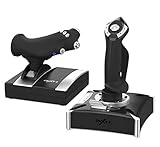
Overview: The PXN-2119Pro positions itself as an affordable multi-platform flight stick with vibration feedback, targeting budget-conscious gamers across PC, PlayStation 4, and Xbox One. This single-unit throttle-and-stick combo aims to deliver versatility at a fraction of premium brand pricing.
What Makes It Stand Out: Vibration feedback is rare in this price bracket, adding immersion to combat and turbulence scenarios. The cross-platform compatibility is impressive, supporting multiple generations of consoles and PC. The integrated throttle unit saves desk space compared to separate HOTAS configurations, making it practical for casual setups.
Value for Money: At entry-level pricing, this stick undercuts Thrustmaster and Logitech alternatives by 50-60%. For gamers wanting basic flight controls across multiple platforms, the cost-to-feature ratio is compelling. However, the value diminishes if you factor in the time investment required for setup and troubleshooting.
Strengths and Weaknesses: Strengths: Budget-friendly; vibration feedback; multi-platform support; compact integrated design; works with major flight sim titles.
Weaknesses: Complex, frustrating setup requiring driver downloads and original console controllers; no Mac or PS5 support; build quality feels toy-like; documentation is poorly translated; button mapping inconsistencies across platforms.
Bottom Line: The PXN-2119Pro serves budget gamers willing to endure a steep setup curve. If you’re technically patient and prioritize price over plug-and-play convenience, it’s functional. For most users, spending slightly more on a Thrustmaster T-Flight yields better reliability and support.
8. Thrustmaster T-Flight Stick X - Compatible with PS3/PC

Overview: The T-Flight Stick X represents Thrustmaster’s entry-level offering for PC and legacy PS3 systems. This plug-and-play stick delivers essential flight controls without complexity, targeting newcomers to flight simulation who want immediate gratification without software headaches.
What Makes It Stand Out: True plug-and-play functionality sets it apart—no drivers, no configuration utilities, just connect and fly. The wide handrest provides surprising comfort during extended sessions, and the 12 fully programmable buttons cover basic simulation needs. Pre-configured profiles for Microsoft Flight Simulator X and Blazing Angels demonstrate its beginner-friendly approach.
Value for Money: Now available at clearance pricing, this stick offers tremendous value for PC users seeking basic controls. It’s approximately 60% cheaper than current-generation alternatives, making it ideal for testing flight sim interest without significant investment. For PS3 collectors, it’s one of the few compatible sticks still obtainable.
Strengths and Weaknesses: Strengths: Effortless installation; comfortable ergonomics; reliable brand support; programmable buttons; extremely affordable; lightweight for portability.
Weaknesses: Severely outdated; limited to 4 axes and 12 buttons; no modern console support; plastic construction creaks under vigorous use; lacks precision for serious simulation; no vibration or force feedback.
Bottom Line: The T-Flight Stick X is a relic that remains viable only for absolute beginners on PC or nostalgic PS3 gamers. Its simplicity is charming, but modern flight sims demand more buttons and precision. Consider this a disposable entry point—functional but quickly outgrown.
9. Thrustmaster T-Flight Full Kit (Compatible with Xbox Serie X|S and PC)

Overview: Thrustmaster’s T-Flight Full Kit delivers a complete flight simulation ecosystem for Xbox Series X|S and PC, integrating a HOTAS throttle, stick, and rudder pedals in one package. This all-in-one solution targets console sim pilots who want authentic control without mixing brands.
What Makes It Stand Out: The S.M.A.R.T slide rail rudder pedals represent a breakthrough at this price point, delivering smooth, realistic yaw control that typically costs $150+ separately. Official Xbox button integration (Guide/View/Menu) enables seamless console navigation without reaching for a gamepad. The detachable throttle with 5 axes and 14 buttons provides extensive command options for complex aircraft.
Value for Money: As a bundled kit, it saves approximately $100 compared to purchasing comparable separate components. The pedal inclusion alone justifies the mid-range price tag, positioning it as the most affordable complete simulation setup from a major manufacturer. Console compatibility adds further value for Xbox pilots.
Strengths and Weaknesses: Strengths: Complete solution out of the box; innovative pedal system; official Xbox certification; ergonomic pedal design with heel rests; solid throttle detents; excellent button layout.
Weaknesses: Stick uses contact sensors, not magnetic; throttle action feels slightly sticky compared to premium units; limited Xbox flight sim library; pedals slide on carpet without modification; no PlayStation support.
Bottom Line: For Xbox Series X|S or PC users wanting a full simulation experience without premium spending, this kit is unbeatable. The pedals elevate it from “good” to “great,” making it the smartest mid-range investment for aspiring virtual pilots who demand complete control.
10. Thunderstick tsticks GRS Flight Yoke

Overview: The Thunderstick GRS Flight Yoke breaks from traditional joystick design, offering a compact yoke controller for multi-platform arcade and simulation use. Targeting retro gaming enthusiasts and custom cabinet builders, it prioritizes broad compatibility over professional-grade precision.
What Makes It Stand Out: Yoke configuration at this price point is unique, providing authentic Cessna-style control for flight sims. The extreme compatibility list—spanning Windows, Linux, Mac, Raspberry Pi, and arcade cabinets—makes it a Swiss Army knife for experimental builds. Dual mouse modes and pitch reversion offer unexpected flexibility for non-standard applications.
Value for Money: This is among the cheapest yoke-style controllers available, costing 70% less than premium yokes from Honeycomb or Saitek. For arcade projects or casual flight sim dabbling, the value is exceptional. However, serious pilots will find its limitations quickly justify higher investment.
Strengths and Weaknesses: Strengths: Inexpensive yoke alternative; massive platform support; compact footprint; simple analog control; gamepad emulation mode; ideal for Arcade1Up mods.
Weaknesses: Only 6 buttons severely limits functionality; imprecise analog mechanism; lightweight construction feels toy-grade; no throttle control included; unsuitable for realistic simulation; minimal documentation.
Bottom Line: The Thunderstick GRS is a niche product for hobbyists and arcade builders, not serious sim pilots. Its charm lies in experimentation and retro gaming. If you’re building a Pi-powered cabinet or want a cheap yoke for casual Microsoft Flight Simulator use, it’s adequate. For authentic training, invest in a proper yoke system.
Understanding Flight Stick Technology in 2026
Flight simulation hardware has undergone remarkable transformation, with 2026 bringing several key technological advances that benefit newcomers. Modern entry-level sticks now incorporate features previously found only in professional-grade equipment, making the learning curve less steep while providing room for growth.
Hall Effect Sensors vs. Potentiometers
The heart of any flight stick lies in its sensor technology. Hall effect sensors have become increasingly common in beginner-tier hardware, offering contactless operation that eliminates the wear and drift issues associated with traditional potentiometers. These magnetic sensors maintain accuracy over thousands of hours of use, making them ideal for new simmers who want reliability without constant recalibration. Potentiometer-based sticks still exist in the budget segment, but their mechanical nature means they’ll eventually develop dead zones that require either software compensation or hardware replacement.
Force Feedback and Haptic Technology
Haptic feedback has evolved beyond simple vibration motors. Modern flight sticks for beginners now feature nuanced feedback systems that communicate airflow changes, stall warnings, and control surface resistance. This tactile information proves invaluable for new pilots learning the subtle cues that separate smooth flying from constant overcorrection. While premium force feedback systems remain expensive, entry-level haptic implementations provide meaningful sensory input without breaking the bank.
Essential Features for Beginner Flight Sticks
When selecting your first flight stick, certain features will dramatically impact your learning experience and long-term satisfaction. Prioritizing these elements ensures your hardware supports rather than hinders your progression.
Button Layout and Accessibility
A well-designed button layout serves as your cockpit’s nerve center. Look for sticks offering 12-16 programmable buttons within comfortable thumb reach, arranged in logical groups that mirror real aircraft controls. Hat switches should provide distinct tactile clicks for menu navigation, while base-mounted buttons work perfectly for less-frequently-used functions like autopilot or view changes. The key is intuitive placement that becomes muscle memory within your first month of regular use.
Throttle Integration Options
The throttle axis represents half your control input, and integrated solutions offer the best value for beginners. Modern entry-level flight sticks typically include either a small throttle lever on the stick base or a separate detachable throttle unit. The ideal setup provides smooth, linear travel with adjustable tension and at least one additional axis for rudder control or propeller management. Separate throttle quadrants, while more realistic, often prove overwhelming for new simmers still mastering basic pitch and roll coordination.
Types of Flight Sticks Available
The market segments flight sticks into clear tiers, each serving different commitment levels and budget constraints. Understanding these categories helps set realistic expectations for your first purchase.
Entry-Level Flight Sticks
Entry-level sticks in 2026 typically range from $50 to $120, offering solid construction with plastic bodies and metal-reinforced pivots. These units focus on core functionality—precise axes, adequate button count, and reliable sensors—while omitting advanced features like multiple throttle levers or extensive LCD displays. The best models in this category surprise newcomers with their durability, often lasting two to three years before any performance degradation becomes noticeable.
Mid-Range Solutions
Stepping up to the $150-$250 bracket unlocks significant quality-of-life improvements. Mid-range sticks feature predominantly metal construction, customizable springs for tension adjustment, and more sophisticated throttle units with additional axes. This tier often includes modular designs allowing you to expand your setup over time, making it perfect for committed beginners who know they’ll stick with the hobby. The enhanced precision and build quality noticeably improve control smoothness, particularly during delicate maneuvers like formation flying or instrument approaches.
Premium Beginner-Friendly Models
The $300+ category might seem excessive for newcomers, but certain models justify their price through exceptional longevity and professional-grade components that grow with your skills. These sticks often feature interchangeable grips modeled after real military or commercial aircraft, load cell sensors for unparalleled precision, and extensive software ecosystems. While not necessary for your first month, they eliminate the need for future upgrades, making them cost-effective for simmers who quickly progress beyond basics.
Budget Considerations
Smart budgeting for your first flight stick involves more than just the initial purchase price. The total cost of ownership includes potential upgrades, accessories, and software that enhance your experience.
Setting a realistic budget means accounting for the hidden costs that catch many newcomers off guard. Mounting solutions, USB hubs for expanded setups, and premium simulation software can add 30-50% to your hardware investment. However, many modern flight sticks include comprehensive software suites that eliminate the need for additional programming tools, representing genuine value in the entry-level market.
Consider starting with a solid standalone stick and adding a separate throttle or rudder pedals after three to six months of regular practice. This staged approach lets you spread costs while confirming your commitment to the hobby. The resale market for quality flight sticks remains strong, meaning you can recoup 60-70% of your investment if you decide to upgrade or exit the hobby.
Compatibility and Setup
Modern flight simulation spans multiple platforms and software ecosystems, making compatibility a critical consideration for your first purchase. The days of PC-exclusive flight simming are long gone, and 2026 hardware reflects this expanded landscape.
PC Compatibility
PC remains the dominant platform for serious flight simulation, and virtually all modern flight sticks offer plug-and-play functionality with Windows 11 and 12. The key differentiator lies in software support—top-tier manufacturers provide regular driver updates that maintain compatibility with new simulation titles and Windows updates. Look for sticks with 32-bit and 64-bit driver support, ensuring broad software compatibility across both legacy simulators and cutting-edge 2026 releases.
Console Integration
PlayStation and Xbox platforms now support a growing library of flight simulation titles, making console-compatible sticks increasingly relevant for beginners. These models typically feature simplified button layouts and automatic profile switching when detected by the console. The trade-off comes in reduced customization options compared to PC, but the seamless plug-and-play experience appeals to newcomers intimidated by complex software configuration.
Wireless vs. Wired Connections
Wireless technology has matured significantly, with modern 2.4GHz connections offering latency comparable to wired USB connections. For beginners, wireless sticks eliminate cable clutter and allow flexible positioning, though they require occasional battery management. Wired connections remain the gold standard for absolute reliability and are mandatory for competitive online flying where every millisecond counts. Most quality sticks now include both options, letting you choose based on your setup preferences.
Ergonomics and Build Quality
Your flight stick becomes an extension of your hand during long simulation sessions, making ergonomic design crucial for both comfort and control precision. The best beginner sticks balance affordability with thoughtful human factors engineering.
Grip Design and Hand Sizes
Modern entry-level sticks accommodate a wide range of hand sizes through contoured grips and adjustable palm rests. Ambidextrous designs benefit left-handed pilots, while right-hand-specific models often provide superior ergonomics for the majority user base. The grip material matters significantly—textured rubber coatings prevent slipping during intense maneuvers, while hard plastic becomes uncomfortable during extended flights. Test the grip circumference if possible; your fingers should comfortably reach all hat switches without stretching.
Material Durability
Entry-level sticks have shed their reputation for flimsiness through improved material science. Reinforced polymer bases provide stability without the cost of full metal construction, while internal metal frames prevent flexing that degrades sensor accuracy. Pay attention to button quality—switches rated for 5+ million presses ensure your stick outlasts your initial learning phase. Detachable cables represent another durability win, allowing easy replacement of the most common failure point without sending the entire unit for repair.
Advanced Features to Grow Into
Forward-thinking beginners choose flight sticks with capabilities they’ll appreciate six months into their simulation journey. These features prevent premature upgrades and maintain excitement as skills improve.
Adjustable Resistance
The ability to modify stick tension transforms your flying experience as you progress. Loose springs benefit helicopter simulation and aerobatic flying, while stiffer resistance improves precision for instrument approaches and formation flying. Modern entry-level sticks often include interchangeable springs or adjustable tension screws, letting you fine-tune the feel without disassembling the unit. This customization proves invaluable when transitioning between aircraft types within your simulation software.
Programmable Profiles
Onboard memory for storing multiple control profiles eliminates the tedium of rebinding controls for different aircraft. A quality beginner stick should support at least three distinct profiles accessible via a hardware button. This feature shines when switching between a Cessna 172’s simple control layout and the complex button arrays of an Airbus A320 or F-16. The best implementations include LED indicators showing your active profile, preventing confusion during impromptu aircraft changes.
Software and Customization
The hardware only tells half the story—robust software support defines the true value of your flight stick investment. Modern manufacturers recognize that newcomers need intuitive tools, not engineering-grade complexity.
Leading flight stick software in 2026 features graphical interfaces that visualize your button assignments in real-time, making programming intuitive even for those unfamiliar with aviation terminology. Drag-and-drop functionality lets you assign complex macros—like a full startup sequence—single button presses. The software should also include calibration wizards that automatically detect and compensate for minor sensor irregularities, ensuring consistent performance without manual tweaking.
Community-created profiles represent another software advantage. Active user communities share pre-configured setups for popular aircraft and simulation titles, letting you download and install professional-grade control schemes in minutes. This ecosystem support proves particularly valuable for beginners overwhelmed by the prospect of manually programming dozens of functions across multiple simulation platforms.
Common Mistakes to Avoid
First-time buyers consistently fall into several traps that diminish their initial flight simulation experience. Awareness of these pitfalls helps you make a smarter purchasing decision.
The most frequent error involves buying overly complex hardware before mastering fundamentals. A stick with 30+ buttons and multiple throttle axes looks impressive but creates confusion that slows skill development. Start simple and expand as your needs become clear. Another mistake is prioritizing realism over functionality—replica military sticks with authentic button placements often prove less practical for general aviation simulation than more generic, flexible designs.
Ignoring software support represents another critical oversight. A beautifully engineered stick becomes paperweight without reliable drivers and configuration tools. Always research a manufacturer’s software update history and community forum activity before purchasing. Companies that actively engage with users and release regular updates demonstrate commitment to long-term product support.
Where to Buy and What to Look For
The purchasing channel affects both your price and support experience. While online marketplaces offer convenience and competitive pricing, specialized simulation retailers provide expertise that proves invaluable for newcomers.
Authorized dealers often bundle flight sticks with simulation software trials or extended warranties, adding value beyond the hardware itself. They also maintain relationships with manufacturers, facilitating smoother warranty claims if issues arise. When buying online, verify seller ratings and ensure you’re purchasing from authorized distributors to avoid counterfeit products that plague the entry-level market.
Physical retail locations, though increasingly rare, offer the unbeatable advantage of hands-on testing. Feeling the stick’s action, button placement, and overall build quality provides information no review can replicate. If local testing isn’t possible, watch detailed video reviews focusing on button presses, stick movement smoothness, and software demonstrations to make an informed remote purchase.
Frequently Asked Questions
What is the ideal budget for a first flight stick in 2026?
A quality entry-level flight stick costs between $75 and $150, offering durable construction, reliable sensors, and enough buttons for basic to intermediate simulation. This price range typically includes integrated throttle control and comprehensive software support.
Should beginners choose a stick with separate throttle or integrated throttle control?
Integrated throttle units provide the best value and simplicity for newcomers. A small throttle lever on the stick base lets you learn power management without the complexity of a separate quadrant. Upgrade to a standalone throttle after mastering basic flight maneuvers.
How important is force feedback for new simmers?
Modern haptic feedback significantly accelerates learning by providing tactile cues about aircraft behavior. While not essential, it helps beginners develop a feel for stalls, turbulence, and control loading much faster than visual cues alone.
Can entry-level flight sticks handle combat simulation?
Absolutely. Today’s entry-level sticks offer sufficient precision and button count for casual combat flying. Focus on models with at least one hat switch for view control and 12+ programmable buttons to manage weapon systems and countermeasures.
What makes Hall effect sensors better for beginners?
Hall effect sensors eliminate the gradual accuracy loss that plagues potentiometer-based sticks. For newcomers who may use their stick intermittently, this reliability means consistent performance without periodic recalibration or maintenance.
How long should a beginner expect their first flight stick to last?
With regular use, a quality entry-level stick should perform reliably for 3-5 years. Models with Hall effect sensors and metal-reinforced construction often last longer, making them cost-effective despite higher initial prices.
Is wireless connectivity reliable enough for flight simulation?
Modern 2.4GHz wireless connections match wired performance for all but the most competitive online flying. For beginners, wireless convenience outweighs the minimal latency difference, though keeping batteries charged requires minor discipline.
What software should beginners use with their flight stick?
Start with the manufacturer’s included software, which typically supports all major simulation titles. As you advance, consider universal controller software like Joystick Gremlin or Universal Control Remapper for complex profile management across multiple simulators.
Can one flight stick work for both civilian and military aircraft?
Yes, versatile sticks with programmable profiles excel across aircraft types. Create separate profiles for general aviation (simple layout) and military jets (complex systems), switching between them via hardware buttons for seamless transitions.
When should beginners consider upgrading their flight stick?
Consider upgrading after consistently flying for 6-12 months when you’ve outgrown your stick’s button count or crave more precise control for advanced maneuvers. Many pilots find their first quality stick serves them well for several years before an upgrade becomes necessary.
See Also
- Top 10 Best Flight Sticks for PC Flight Simulators in 2026
- How to Solve Input Lag with the 10 Best Responsive Flight Sticks in 2026
- Stop Wasting Time Calibrating with the 10 Best Adjustable Flight Sticks This Year
- 10 Best Budget Flight Sticks Under $100 for Casual Gamers in 2026
- 10 Best Gaming Flight Sticks for Immersive Combat Games This Year